

Unfortunately, Google phased out Manifest V2 in Chrome, so the full version of uBlock Origin is no longer available:
In late 2024, Google completed its transition to Manifest V3 in Chrome, which fundamentally changed how browser extensions work. As a result, the full version of uBlock Origin is no longer available for Chrome users. Here's what happened and what your options are now.
Let's switch to Brave, a more privacy-focused browser.
Installation
We can install it from the command-line:
winget install Brave.BraveDisable Brave features
I don't need Leo, Wallet, or the built-in VPN. We can disable these features with a registry policy for the current Windows user:
& {
    $ErrorActionPreference = 'Stop'
    if (!(whoami /groups | findstr S-1-16-12288)) {
        throw 'Run PowerShell as Administrator.'
    }
    $policyPath = 'HKCU:\SOFTWARE\Policies\BraveSoftware\Brave'

    New-Item -Path $policyPath -Force | Out-Null

    $policies = @{
        BraveAIChatEnabled  = 0
        BraveWalletDisabled = 1
        BraveVPNDisabled    = 1
    }

    foreach ($policy in $policies.GetEnumerator()) {
        New-ItemProperty `
            -Path $policyPath `
            -Name $policy.Key `
            -PropertyType DWord `
            -Value $policy.Value `
            -Force | Out-Null
    }

    Write-Host 'Brave policies applied successfully.'
    Write-Host 'Restart Brave for the changes to take effect.'
}
Restart Brave and check brave://policy to verify that the policies are active.
Create the profiles
I want two profiles: Personal and Company. This script lets Brave initialize any missing profiles, then configures their names and avatar slots. It leaves the avatar image files alone; we'll replace those manually in the next section.
& {
    $ErrorActionPreference = 'Stop'

    function Wait-BraveClosed {
        while (Get-Process brave -ErrorAction SilentlyContinue) {
            Read-Host 'Close Brave, then press Enter to continue'
        }
    }

    Wait-BraveClosed
    $brave = @($env:ProgramFiles, ${env:ProgramFiles(x86)}, $env:LOCALAPPDATA) |
        ForEach-Object { "$_\BraveSoftware\Brave-Browser\Application\brave.exe" } |
        Where-Object { Test-Path $_ } | Select-Object -First 1
    if (-not $brave) { throw 'Brave could not be found.' }

    $userData = "$env:LOCALAPPDATA\BraveSoftware\Brave-Browser\User Data"
    $profiles = @(
        @{ Name = 'Personal'; Directory = 'Default'; Index = 57 }
        @{ Name = 'Company'; Directory = 'Profile 1'; Index = 56 }
    )
    foreach ($profile in $profiles) {
        $name = Read-Host "Profile name [$($profile.Name)]"
        if (-not [string]::IsNullOrWhiteSpace($name)) { $profile.Name = $name }
    }

    function Wait-ForFile($Path, $Seconds = 15) {
        $timeout = [DateTime]::UtcNow.AddSeconds($Seconds)
        while (-not (Test-Path $Path) -and [DateTime]::UtcNow -lt $timeout) {
            Start-Sleep -Milliseconds 500
        }
        if (-not (Test-Path $Path)) { throw "File creation timed out: $Path" }
    }

    function Set-JsonProperty($Object, $Name, $Value) {
        if ($Object.PSObject.Properties.Name -contains $Name) {
            $Object.$Name = $Value
        }
        else {
            $Object | Add-Member NoteProperty $Name $Value
        }
    }

    function New-BraveProfile($Profile) {
        $preferences = "$userData\$($Profile.Directory)\Preferences"
        if (Test-Path $preferences) { return }

        Write-Host "Creating profile: $($Profile.Name)"
        $arguments = "--headless --dump-dom --user-data-dir=`"$userData`" --profile-directory=`"$($Profile.Directory)`" --no-first-run --no-default-browser-check about:blank"
        Start-Process $brave -ArgumentList $arguments -Wait | Out-Null
        Wait-ForFile $preferences
    }

    foreach ($profile in $profiles) { New-BraveProfile $profile }

    $statePath = "$userData\Local State"
    $state = Get-Content $statePath -Raw | ConvertFrom-Json
    if (-not $state.profile) { Set-JsonProperty $state 'profile' ([pscustomobject]@{}) }
    if (-not $state.profile.info_cache) {
        Set-JsonProperty $state.profile 'info_cache' ([pscustomobject]@{})
    }
    foreach ($profile in $profiles) {
        $preferences = "$userData\$($profile.Directory)\Preferences"
        Write-Host "Updating profile: $($profile.Name)"
        $prefs = Get-Content $preferences -Raw | ConvertFrom-Json
        Set-JsonProperty $prefs.profile 'name' $profile.Name
        Set-JsonProperty $prefs.profile 'avatar_index' $profile.Index
        Set-JsonProperty $prefs.profile 'using_default_name' $false
        Set-JsonProperty $prefs.profile 'using_default_avatar' $false
        Set-JsonProperty $prefs.profile 'using_gaia_avatar' $false
        if (-not $prefs.browser) { Set-JsonProperty $prefs 'browser' ([pscustomobject]@{}) }
        if (-not $prefs.browser.theme) { Set-JsonProperty $prefs.browser 'theme' ([pscustomobject]@{}) }
        Set-JsonProperty $prefs.browser.theme 'color_scheme2' 2
        if (-not $prefs.NewTabPage) { Set-JsonProperty $prefs 'NewTabPage' ([pscustomobject]@{}) }
        Set-JsonProperty $prefs.NewTabPage 'FooterVisible' $false
        Copy-Item $preferences "$preferences.bak" -Force
        Set-Content $preferences ($prefs | ConvertTo-Json -Depth 100) -Encoding UTF8

        if (-not $state.profile.info_cache.($profile.Directory)) {
            Set-JsonProperty $state.profile.info_cache $profile.Directory ([pscustomobject]@{})
        }
        $info = $state.profile.info_cache.($profile.Directory)
        Set-JsonProperty $info 'name' $profile.Name
        Set-JsonProperty $info 'avatar_icon' "chrome://theme/IDR_PROFILE_AVATAR_$($profile.Index)"
        Set-JsonProperty $info 'is_using_default_name' $false
        Set-JsonProperty $info 'is_using_default_avatar' $false
        Write-Host "Configured profile: $($profile.Name)"
    }
    Copy-Item $statePath "$statePath.bak" -Force
    Set-Content $statePath ($state | ConvertTo-Json -Depth 100) -Encoding UTF8
}
Fix the profile icons
I'm using 2 profiles on my browser: Company for business and Personal for private browsing. In Chrome I had custom profile pictures, but Brave does not have this much wanted feature.
Fortunately, there is a workaround. This script reads the current profile names and avatar slots, then prompts for an image URL for each profile. Leave a prompt empty to skip that profile. It will download the image and put it in the local avatar directory under the known avatar name, thereby overriding the image contents.
& {
    $ErrorActionPreference = 'Stop'

    function Save-Avatar($Name, $Profile) {
        $Prompt = "$($Profile.name) avatar URL (leave empty to skip)"
        $url = Read-Host $Prompt
        if ([string]::IsNullOrWhiteSpace($url)) { return }
        Invoke-WebRequest $url -OutFile "$avatarDirectory\$Name" -UseBasicParsing
    }

    $userData = "$env:LOCALAPPDATA\BraveSoftware\Brave-Browser\User Data"
    $state = Get-Content "$userData\Local State" -Raw | ConvertFrom-Json
    $source = Invoke-WebRequest `
        'https://raw.githubusercontent.com/brave/brave-core/master/chromium_src/chrome/browser/profiles/profile_avatar_icon_util.cc' `
        -UseBasicParsing
    $avatars = @{}
    [regex]::Matches($source.Content, 'IDR_PROFILE_AVATAR_(\d+),\s*"([^"]+\.png)"') |
        ForEach-Object { $avatars["IDR_PROFILE_AVATAR_$($_.Groups[1].Value)"] = $_.Groups[2].Value }
    if (-not $avatars.Count) { throw 'Brave avatar mapping could not be read.' }

    $avatarDirectory = "$userData\Avatars"
    New-Item $avatarDirectory -ItemType Directory -Force | Out-Null

    foreach ($entry in $state.profile.info_cache.PSObject.Properties) {
        $info = $entry.Value
        $icon = $info.avatar_icon -replace '^chrome://theme/', ''
        if (-not $avatars.ContainsKey($icon)) {
            throw "No avatar file mapping for profile '$($info.name)' ($($info.avatar_icon))."
        }
        Save-Avatar $avatars[$icon] $info
    }

    Write-Host 'Profile images configured. Restart Brave to load them.'
}
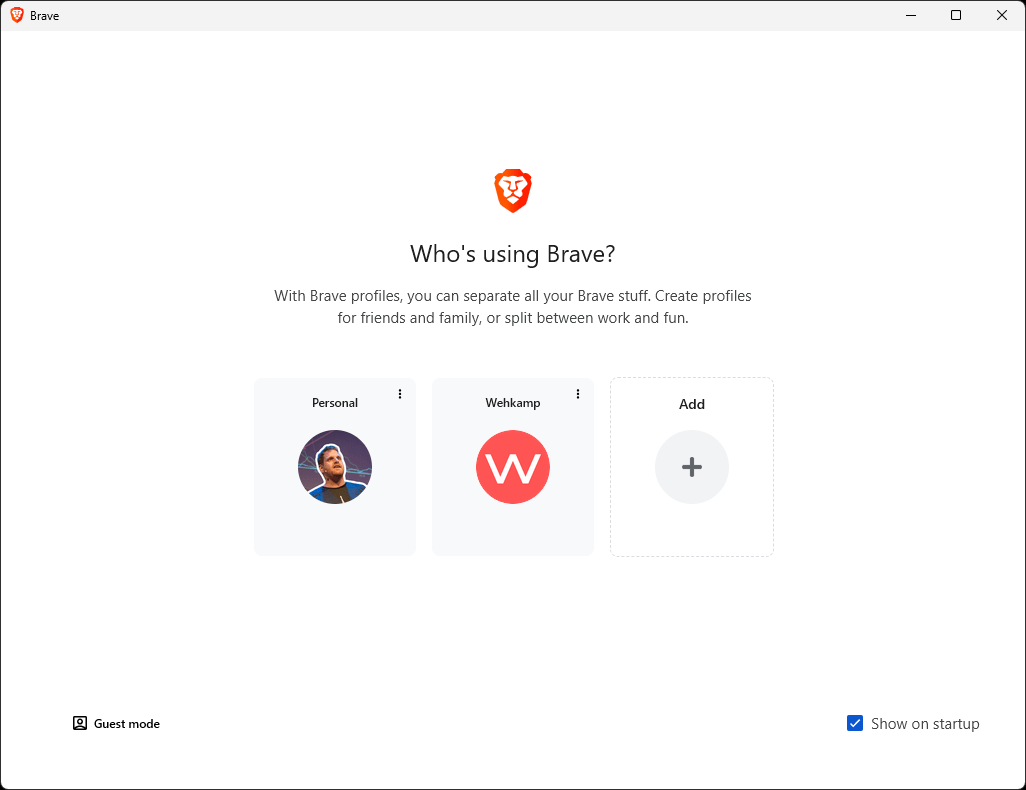
And now you're greeted by:
Install the extensions
Finally, I want the same extensions in both profiles. Brave does not have a supported command-line switch for installing Web Store extensions, so this script uses a per-user normal_installed policy. The extensions are installed automatically in every Brave profile, but you can still disable them.
& {
    $ErrorActionPreference = 'Stop'
    if (!(whoami /groups | findstr S-1-16-12288)) {
        throw 'Run PowerShell as Administrator.'
    }
    $policyPath = 'HKCU:\SOFTWARE\Policies\BraveSoftware\Brave'

    $extensions = [ordered]@{
        Bitwarden      = 'nngceckbapebfimnlniiiahkandclblb'
        ColorZilla     = 'bhlhnicpbhignbdhedgjhgdocnmhomnp'
        MagicCSS       = 'ifhikkcafabcgolfjegfcgloomalapol'
        MarkdownViewer = 'ckkdlimhmcjmikdlpkmbgfkaikojcbjk'
        MinusUnsplash  = 'ancgmphhglnbebohehppcfjfdpakkcca'
        Momentum       = 'laookkfknpbbblfpciffpaejjkokdgca'
        SponsorBlock   = 'mnjggcdmjocbbbhaepdhchncahnbgone'
        WAVE           = 'jbbplnpkjmmeebjpijfedlgcdilocofh'
    }

    $settings = @{}
    foreach ($extension in $extensions.Values) {
        $settings[$extension] = @{
            installation_mode = 'normal_installed'
            update_url = 'https://clients2.google.com/service/update2/crx'
        }
    }

    New-Item $policyPath -Force | Out-Null
    New-ItemProperty $policyPath ExtensionSettings -PropertyType String `
        -Value ($settings | ConvertTo-Json -Depth 3 -Compress) -Force | Out-Null

    Write-Host 'Brave extension policy configured. Restart Brave to install the extensions.'
}
Restart Brave and check brave://policy to verify that the extension policy is active.
"Help" my muscle memory
I'm quick to do ctrl+v and type chrome. But if you want to run Brave (and you still have Chrome due to company policy), you have to patch it in the registry:
& {
  $ErrorActionPreference = 'Stop'
  $brave = @(
    "$env:ProgramFiles\BraveSoftware\Brave-Browser\Application\brave.exe"
    "${env:ProgramFiles(x86)}\BraveSoftware\Brave-Browser\Application\brave.exe"
    "$env:LOCALAPPDATA\BraveSoftware\Brave-Browser\Application\brave.exe"
  ) | Where-Object { $_ -and (Test-Path $_) } | Select-Object -First 1

  if (-not $brave) {
    throw 'Brave niet gevonden.'
  }

  $key = 'HKCU:\Software\Microsoft\Windows\CurrentVersion\App Paths\chrome.exe'

  New-Item $key -Force | Out-Null
  Set-Item $key -Value $brave
  Set-ItemProperty $key -Name 'Path' -Value (Split-Path $brave)

  $item = Get-Item $key

  Write-Host 'Registry patch gezet:'
  Write-Host "  chrome.exe -> $($item.GetValue(''))"
  Write-Host "  Path       -> $($item.GetValue('Path'))"
}