

Currently I'm working on a small WordPress plugin that does syntax highlighting. I have the need to ship some maintenance scripts with my Dev Containers. I want some aliases to interact with the scripts (instead of calling them through /scripts/actions.sh. This solution uses a Bash startup file and a custom Dockerfile.
The idea
My first thought is to copy the scripts to the Dockerfile as expose them like that. I don't like this solution, as it makes our scripts static. In a "native" situation we would also be able to edit and execute the scripts. We want this experience in our Dev Containers as well.
My second thought is a startup script. I already use a startup.sh script to set some container-wide settings. Adding script aliases to the startup will not work, as the terminal session starts in parallel with the startup script.
Solution: let's ship a startup file that makes the scripts executable and aliases them for the user.
.profile
The startup file should do the following:
- Extract the name of the workspace.
- Add the scripts directory to the
PATH. - Make the scripts in the directory executable.
- Alias a script (in our case
release.shasrelease). - Let the user know how to use the alias.
Let's create a .profile file in our .devcontainer directory. We'll use it later to copy it as .bashrc and .zshrc files.
#!/bin/sh

# figure out workspace
export WORKSPACE_NAME=$(pwd | awk -F'/' '{for(i=1;i<=NF;i++) if ($i == "workspaces") {print $(i+1); exit}}')
export WORKSPACE_SCRIPT_PATH="/workspaces/$WORKSPACE_NAME/scripts"

# make scripts executable
pushd $WORKSPACE_SCRIPT_PATH > /dev/null
sudo chmod +x *.sh
popd > /dev/null

export PATH="$PATH:$WORKSPACE_SCRIPT_PATH"

# make aliases for easy execution
# alias script_name='script_name.sh'
alias release='release.sh'

# make sure our .wp-now is present to cache
mkdir -p "$WORKSPACE_SCRIPT_PATH/../.wp-now"

# let the user know
echo ""
echo "To release a new version do:"
echo "\$ release [patch|minor|major]"
echo ""
echo "To start the project:"
echo "\$ wp-now start"
echo ""
If the .profile adheres to Bourne shell (sh), it will run in both Bash and ZSH. You can double check it by running a ShellCheck: shellcheck .devcontainer/.profile.
Dockerfile
Let's copy the .profile file to our docker file:
# Start with the same base image
FROM mcr.microsoft.com/devcontainers/php:0-8.2

RUN apt-get update \
    && apt-get install -y shellcheck \
    && rm -rf /var/lib/apt/lists/*

# Append the profile to the current .bashrc and .zshrc files
# this makes sure we keep the current behavior like colors and aliases
COPY ./.profile /tmp/.profile
RUN cat /tmp/.profile >> /home/vscode/.bashrc && \
    cat /tmp/.profile >> /home/vscode/.zshrc && \
    rm /tmp/.profile
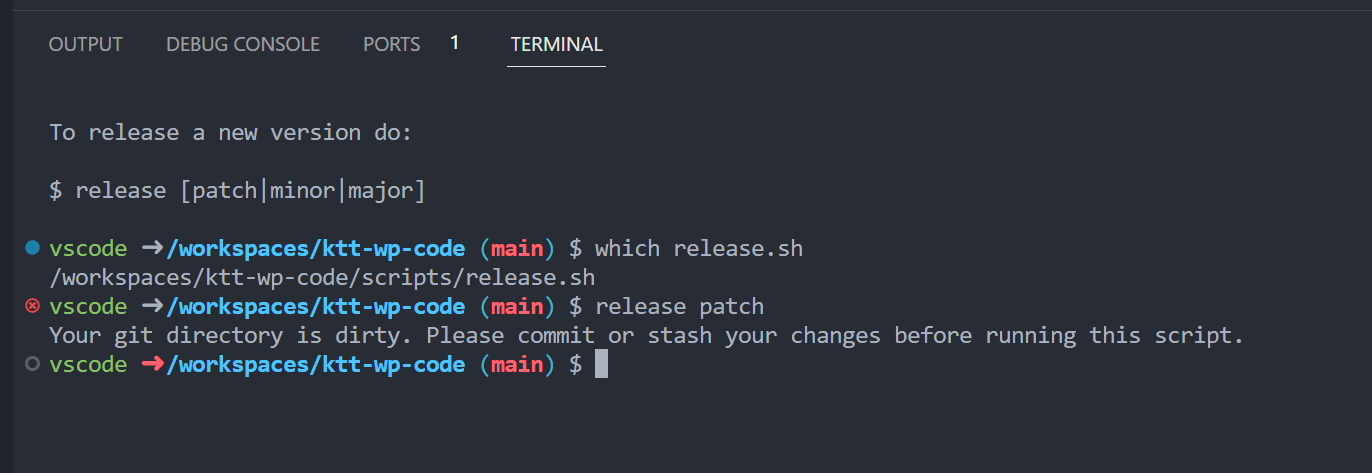
When we now run the dev container we see:
Final thoughts
Easy peasy. If you want to look at the code, please check out the Dev Container directory on GitHub: github.com/KeesCBakker/ktt-wp-code/tree/main/.devcontainer.
Changelog
- added implications for adding a .profile as a Bourne Shell script.
- added support for ZSH.
- initial article.