

The first version of this article was written in 2014, but today in 2021, I still use Knockout! And I still need something that can store changes to objects with the client. It makes page initialization way faster. In this blog I'll show you how easy it is to persist simple models in your localStorage.
Note: this solution will only store simple observable property values (they should not have observables themselves).
Store changes
The localStorage and sessionStorage objects have a very similar API, so we could technically make storage really simple:
let storage = localStorage

let storageWrapper = {
  set: (key, value) => storage.setItem(key, JSON.stringify(value)),
  get: key => JSON.parse(storage.getItem(key)),
}
We will be using this wrapper function to store the value. It will be converted to JSON before it is stored.
Track a change and (re)store it
So, let's create one method that uses the observable itself to track changes:
ko.trackChange = (store, observable, key, echo = null) => {
  //initialize from stored value, or if no value is stored yet,
  //use the current value

  const value = store.get(key)
  if(value !== null){
    if(echo) echo("Restoring value for", key, value)

    //restore current value
    observable(value)
  }

  //track the changes
  observable.subscribe(newValue => {
    if(echo) echo("Storing new value for", key, newValue)
    store.set(key, newValue)
  })
}
This method will also restore the value when it is hooked up.
Detect computed properties
We don't want to save computed observables -- they are computed for a reason! We need to be able to detect them, so we can skip them.
ko.isComputed = instance => {
  if (!instance || !instance.__ko_proto__) {
    return false
  }

  if (instance.__ko_proto__ === ko.dependentObservable) {
    return true
  }

  // Walk the prototype chain
  return ko.isComputed(instance.__ko_proto__)
}
Persist a model
Let's persist the changes of the entire model. The default store is localStorage.
const defaultOptions = Object.freeze({
  storage: localStorage,
  traverseNonObservableProperties: true,
  debug: false
})

ko.persistChanges = (model, prefix = "model-", options = defaultOptions, deep = 0) => {
  options = Object.assign({}, defaultOptions, options)
  options.echo = function () {

    if(!options.debug) return;

    if (deep > 0) {
      return console.log("-".repeat(deep), ...arguments)
    }
    console.log(...arguments)
  }

  const storageWrapper = {
    set: (key, value) => options.storage.setItem(key, JSON.stringify(value)),
    get: key => JSON.parse(options.storage.getItem(key))
  }

  const skip = new Set(model.__skip || [])
  skip.add("__skip")

  for (let n in model) {
    const observable = model[n]
    const key = prefix + n

    if (skip.has(n)) {
      options.echo("Skipping", n, "because it is on the __skip list.")
      continue
    }

    if (ko.isComputed(observable)) {
      options.echo("Skipping", n, "because it is computed.")
      continue
    }

    if (typeof observable === "function") {
      if (!ko.isObservable(observable)) {
        options.echo("Skipping", n, "because it is a function.")
        continue
      }

      ko.trackChange(storageWrapper, observable, key, options.echo)
      options.echo("Tracking change for", n, "in", key)
      continue
    }

    if (!options.traverseNonObservableProperties) {
      options.echo("Skipping", n, "because options.traverseNonObservableProperties is false.")
      continue
    }

    if (typeof observable === "object" && observable !== null && !Array.isArray(observable)) {
      options.echo("Tracking change for object", key)
      ko.persistChanges(observable, key + "-", options, deep + 1)
      continue
    }

    options.echo("Skipping", n, observable)
  }
}
Sometimes I use properties that are themselves not observable, but they have observable properties. These properties will be stored as well (this can be disabled with { traverseNonObservableProperties: false } option).
We can persist a model like this:
const model = new Model()

// persist in localStorage (prefixed with model-)
ko.persistChanges(model)

// persist in sessionStorage with a custom prefix
ko.persistChanges(model, { prefix: "my-own-prefix-", storage: sessionStorage })
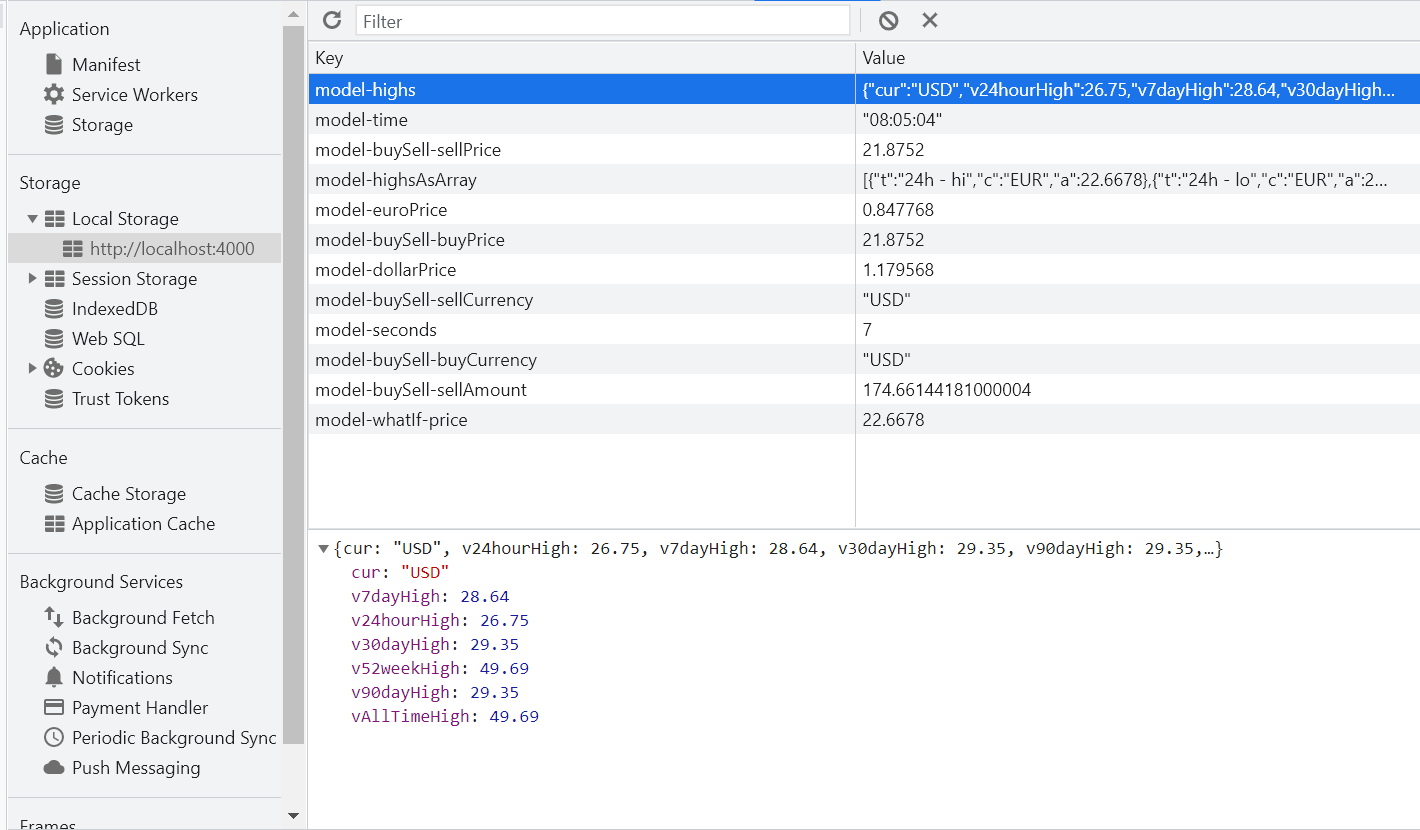
I was building a tracker application and the data is nicely visible in the Chrome development tools:
Skip it!
Sometime you might not want to serialize certain fields. My app contained a click that stored an observable in a field of the model. As that other observable was already tracked, it would not make sense to also track this selection property. Another case had to do with an option class I was passing to sub models. The sub models stored that class as a property. As it is the same thing, it made no sense to tracking.
To prevent these types of properties from being tracked, add those fields to a __skip property:
class Environment {
  constructor(name, options) {
    const self = this

    this.name = name
    this.options = options
    this.__skip = ["options"]
  }
}
Putting it all together
Here is an example I've added to JSFiddle that shows how it works:
//model specification
function SimpleModel() {
    var _this = this;

    this.message = ko.observable('Hello');
    this.subject = ko.observable('World');
    this.text = ko.computed(function () {
        return _this.message() + ' ' + _this.subject() + '!';
    });
}

//new it up
var vm = new SimpleModel();
var options = {
  storage: sessionStorage
};

//bind to interface
ko.applyBindings(vm);

//persist it
ko.persistChanges(vm, 'vm-', options);

//alert 1 - should be 'Hello World!'
//at least the first time ;-)
alert(vm.text());

//change it
vm.message('Bye');

//alert 2 - should be 'Bye World!'
alert(vm.text());

//load a new one up to check
var vm2 = new SimpleModel();
ko.persistChanges(vm2, 'vm-', options);

//alert 3 - should be 'Bye World!'
alert(vm2.text());
Final thoughts
Wow... I can't believe I can still use KnockoutJS in 2021 2024. So cool to see that the project is still running (although the last version is 3.51 and dates back to 2019).
Changelog
- Fixed typo with
}. - As I keep findings ways to use KnockoutJS, I improved the code with a
__skiptracker, to skip certain properties. Also added a debug option, to get some more results in the logs. - Added the
traverseNonObservablePropertiesoption to track observables of properties that are not observable, but have a value with observable properties. Added a new screenshot with more detail. - Rewrote article to not include Amplify as
localStorageandsessionStorageare now normal. - Initial article.
Thanks — I’m finally making the jump to javascript clients in a big way and I find Knockout MVVM very much like the experience I have from the WP XAML two-way binding.
Please blog more on this topic.
Jim
I’m working on a new script dat stores the model in a single slot in storage. This method fails when sub observables are used in arrays. Got it fixed in the lab :D
Kees, where is the sub observables fix? I’m using knockout.mapping to populate my observableArrays. The arrays goes to localStorage, but with empty data.
Thanks,
Don
If you don’t mind working through some code, check http://tools.keestalkstech.com/Generator/. Just include a copy of http://tools.keestalkstech.com/Generator/Scripts/knockout.extra.js. You’ll need to use ko.onlySerializeObservables and ko.__AOM. My model shows how. I’m working on a serious blog post for this feature.
Kees, I have a problem. When I work with persistChanges I run in a Circular Reference error.
The problem occurs when I raise a popup to store some attachments. Before I load the popup I do persistchanges, reload the current data, because it is changed in the back to get the current version, and then try to save the knockout data.
When using json.stringify it runs in the circular reference error.
Hey André, sorry for the late reaction. Do you have a JSFiddle example for me? I would love to help.
Will this work with an observable arrays as well?
No, because with arrays you need to reconstruct the array object types en that’s hard to do. I did it for a project: http://tools.keestalkstech.com/Generator/. You might want to inspect that source.