

The first version of this article was written in 2014, and I still use Knockout today! I still need a way to persist object changes on the client because it makes page initialization much faster. In this post, I'll show you how easy it is to persist simple models in local storage.
Note: this solution will only store simple observable property values (they should not have observables themselves).
Store changes
The local storage and session storage objects have a very similar API, so we can wrap either one:
const createStorageWrapper = storage => ({
  set: (key, value) => {
    try {
      const json = JSON.stringify(value)

      if (json === undefined) {
        storage.removeItem(key)
        return
      }

      storage.setItem(key, json)
    } catch (error) {
      console.warn("Could not store", key, error)
    }
  },
  get: key => {
    try {
      const json = storage.getItem(key)

      if (json === null) {
        return { found: false }
      }

      return { found: true, value: JSON.parse(json) }
    } catch (error) {
      console.warn("Could not restore", key, error)
      return { found: false }
    }
  }
})
The wrapper converts values to JSON before storing them. An undefined value removes the existing key instead of storing invalid JSON. Reading returns both whether a value was found and the value itself, so a stored null remains distinguishable from a missing key. Storage and JSON errors are logged, while the model keeps its current value.
Track a change and (re)store it
So, let's create one method that uses the observable itself to track changes:
ko.trackChange = (store, observable, key, echo = null) => {
  //initialize from stored value, or if no value is stored yet,
  //use the current value

  const stored = store.get(key)
  if (stored.found) {
    if(echo) echo("Restoring value for", key, stored.value)

    //restore current value
    observable(stored.value)
  }

  //track the changes
  observable.subscribe(newValue => {
    if(echo) echo("Storing new value for", key, newValue)
    store.set(key, newValue)
  })
}
This method will also restore the value when it is hooked up.
Detect computed properties
We don't want to save computed observables -- they are computed for a reason! Fortunately, Knockout provides ko.isComputed, so we can use it to detect and skip them.
Persist a model
Let's persist the changes of the entire model. The default store is local storage.
const defaultOptions = Object.freeze({
  storage: localStorage,
  traverseNonObservableProperties: true,
  debug: false
})

ko.persistChanges = (
  model,
  prefix = "model-",
  options = defaultOptions,
  deep = 0,
  visited = new WeakSet()
) => {
  options = Object.assign({}, defaultOptions, options)
  options.echo = function () {

    if(!options.debug) return;

    if (deep > 0) {
      return console.log("-".repeat(deep), ...arguments)
    }
    console.log(...arguments)
  }

  if (visited.has(model)) {
    options.echo("Skipping", prefix, "because the object was already visited.")
    return
  }
  visited.add(model)

  const storageWrapper = createStorageWrapper(options.storage)
  const skip = new Set(model.__skip || [])
  skip.add("__skip")

  for (const n of Object.keys(model)) {
    const observable = model[n]
    const key = prefix + n

    if (skip.has(n)) {
      options.echo("Skipping", n, "because it is on the __skip list.")
      continue
    }

    if (ko.isComputed(observable)) {
      options.echo("Skipping", n, "because it is computed.")
      continue
    }

    if (typeof observable === "function") {
      if (!ko.isObservable(observable)) {
        options.echo("Skipping", n, "because it is a function.")
        continue
      }

      ko.trackChange(storageWrapper, observable, key, options.echo)
      options.echo("Tracking change for", n, "in", key)
      continue
    }

    if (!options.traverseNonObservableProperties) {
      options.echo("Skipping", n, "because options.traverseNonObservableProperties is false.")
      continue
    }

    if (typeof observable === "object" && observable !== null && !Array.isArray(observable)) {
      options.echo("Tracking change for object", key)
      ko.persistChanges(observable, key + "-", options, deep + 1, visited)
      continue
    }

    options.echo("Skipping", n, observable)
  }
}
Object.keys limits traversal to the model's own properties. The shared WeakSet remembers visited objects, preventing circular references or reused objects from being traversed repeatedly.
Sometimes I use properties that are themselves not observable, but they have observable properties. These properties will be stored as well (this can be disabled with the { traverseNonObservableProperties: false } option).
We can persist a model like this:
const model = new Model()

// persist in localStorage (prefixed with model-)
ko.persistChanges(model)

// persist in sessionStorage with a custom prefix
ko.persistChanges(model, "my-own-prefix-", { storage: sessionStorage })
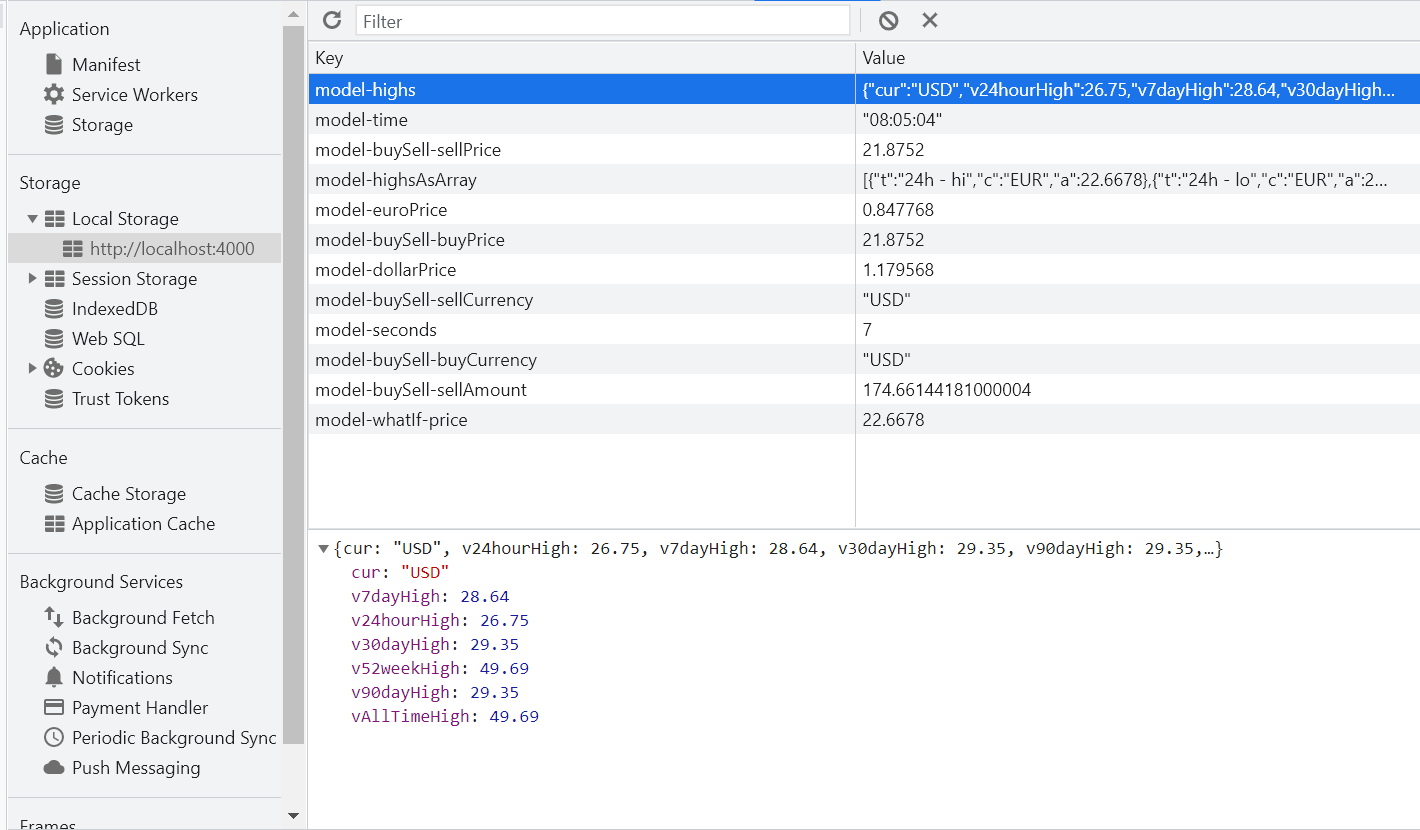
I was building a tracker application, and the data is nicely visible in Chrome DevTools:
Skip it!
Sometimes you might not want to serialize certain fields. My app had a click handler that stored an observable in a model property. Because that observable was already tracked, it would not make sense to track the selection property as well. Another case involved an options instance that I passed to submodels. The submodels stored that instance as a property. Because it was the same object, it made no sense to track it again.
To prevent these types of properties from being tracked, add those fields to a __skip property:
class Environment {
  constructor(name, options) {
    const self = this

    this.name = name
    this.options = options
    this.__skip = ["options"]
  }
}
Use the query string as storage
Local and session storage aren't our only options. The persistence function works with any storage-like object that can read, write, and remove values. That means we can even persist observable values in the query string:
class QueryStringStorage {
  getItem(key) {
    const value = new URL(window.location.href).searchParams.get(key)

    if (value === null) {
      return null
    }

    if (["true", "false", "null"].includes(value)) {
      return value
    }

    return JSON.stringify(value)
  }

  setItem(key, json) {
    const url = new URL(window.location.href)
    const value = JSON.parse(json)

    url.searchParams.set(key, value === null ? "null" : String(value))
    window.history.replaceState(window.history.state, "", url)
  }

  removeItem(key) {
    const url = new URL(window.location.href)
    url.searchParams.delete(key)
    window.history.replaceState(window.history.state, "", url)
  }
}
We can use it just like the other storage implementations:
ko.persistChanges(model, "", {
  storage: new QueryStringStorage()
})
This implementation treats true, false, and null as typed values and all other values as strings. That works well for form values. If your model needs literal strings with those exact values, add escaping or another type marker.
I use this approach in my Dockerfile Generator for .NET. Every observable becomes a separate query parameter, making a configured generator easy to bookmark or share. You can find the complete implementation on GitHub.
Query strings are visible in the browser, logs, and shared links, so don't use this storage for sensitive values. URLs also have practical length limits, making this approach suitable for compact configuration rather than large models.
Example
Here is a JSFiddle example showing how the model is persisted in session storage:
//model specification
function SimpleModel() {
    var _this = this;

    this.message = ko.observable('Hello');
    this.subject = ko.observable('World');
    this.text = ko.computed(function () {
        return _this.message() + ' ' + _this.subject() + '!';
    });
}

//new it up
var vm = new SimpleModel();
var options = {
  storage: sessionStorage
};

//bind to interface
ko.applyBindings(vm);

//persist it
ko.persistChanges(vm, 'vm-', options);

//alert 1 - should be 'Hello World!'
//at least the first time ;-)
alert(vm.text());

//change it
vm.message('Bye');

//alert 2 - should be 'Bye World!'
alert(vm.text());

//load a new one up to check
var vm2 = new SimpleModel();
ko.persistChanges(vm2, 'vm-', options);

//alert 3 - should be 'Bye World!'
alert(vm2.text());
Final thoughts
Wow... I can't believe I can still use KnockoutJS in 2021 2024 2026. So cool to see that the project is still maintained. The current version is 3.5.3.
Changelog
- Updated Knockout and persistence handling for session storage prefixes, null and undefined values, storage errors, and safe object traversal. Removed our custom computed detection in favor of Knockout's built-in
ko.isComputed. Added a query string storage example based on the Dockerfile Generator for .NET. - As I keep finding ways to use KnockoutJS, I improved the code with a
__skiptracker, to skip certain properties. Also added a debug option, to get some more results in the logs. - Added the
traverseNonObservablePropertiesoption to track observables of properties that are not observable, but have a value with observable properties. Added a new screenshot with more detail. - Initial article.
Thanks — I’m finally making the jump to javascript clients in a big way and I find Knockout MVVM very much like the experience I have from the WP XAML two-way binding.
Please blog more on this topic.
Jim
I’m working on a new script dat stores the model in a single slot in storage. This method fails when sub observables are used in arrays. Got it fixed in the lab :D
Kees, where is the sub observables fix? I’m using knockout.mapping to populate my observableArrays. The arrays goes to localStorage, but with empty data.
Thanks,
Don
If you don’t mind working through some code, check http://tools.keestalkstech.com/Generator/. Just include a copy of http://tools.keestalkstech.com/Generator/Scripts/knockout.extra.js. You’ll need to use ko.onlySerializeObservables and ko.__AOM. My model shows how. I’m working on a serious blog post for this feature.
Kees, I have a problem. When I work with persistChanges I run in a Circular Reference error.
The problem occurs when I raise a popup to store some attachments. Before I load the popup I do persistchanges, reload the current data, because it is changed in the back to get the current version, and then try to save the knockout data.
When using json.stringify it runs in the circular reference error.
Hey André, sorry for the late reaction. Do you have a JSFiddle example for me? I would love to help.
Will this work with an observable arrays as well?
No, because with arrays you need to reconstruct the array object types en that’s hard to do. I did it for a project: http://tools.keestalkstech.com/Generator/. You might want to inspect that source.