

Node.js is getting more popular by the day. It breaks JavaScript free from the browser. I would love to auto start an application - much like a Windows service - without keeping a console window open. There are many programs / services to wrap node applications into an executable, but I like to stick with just Node. This small trick will start your Node application windowless on Windows.
VBS to the rescue
I've created a small Visual Basic Script called app.vbs that will start your node application within a hidden window:
CreateObject("Wscript.Shell").Run "node app.js", 0The little zero at the end does the trick. The string is the command to start the node process with the app.js. The .vbs extension is executable in Windows.
Autostart
To execute it automatically at startup, open the %AppData%\Microsoft\Windows\Start Menu\Programs\Startup\ directory and add a shortcut to the app.vbs file.
Proof of concept
So let's build a small app to proof that it works. The following script will create a web server and log all the requests to a debug file. We'll stream the file back. The /clear will clear the log file. The /kill will stop the app - this is very important, because the app will be started without a window. This will give us an easy way to shut it down.
var app = require('express')();
var fs = require('fs');
var util = require('util');
var logFileName = __dirname + '/debug.log';

//log number of requests
var nrOfRequests = 0;

//capture all requests
app.get('*', (req, res) => {

    nrOfRequests++;
    console.log(`${nrOfRequests}. [${req.url}] on ${new Date()}`);

    res.sendFile(logFileName, () => {
        if (req.url == '/kill')
            setTimeout(() => process.exit(), 500);
        else if (req.url == '/clear') {
            fs.createWriteStream(logFileName, { flags: 'w' })
        }
    });
});

//log to file
var logFile = fs.createWriteStream(logFileName, { flags: 'a' });
var logProxy = console.log;
console.log = function (d) { //
    logFile.write(util.format(d || '') + '\n');
    logProxy.apply(this, arguments);
};

//start listening
var port = process.env.PORT || 5000;
app.listen(port, function () {
    console.log('Application started on ' + new Date());
    console.log("Listening on " + port);
});
Try it out!
Don't forget to execute a npm install express to install the web server! Always make sure that the node app.js works. The .vbs will not create a window, so you won't see if it crashes.
- Execute the
app.vbs. This will create a process: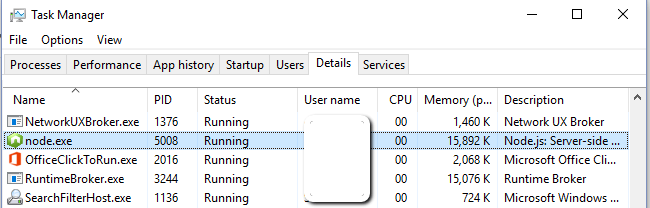
- Open up the app in your browser
http://localhost:5000and you'll see:
- Play around with it and kill the application with
http://localhost:5000/kill. This request stops the node application. You'll see that it is no longer present in the task manager.


Wrap-up
So, that's it. Pretty easy. Remember: this only works under Windows! Also remember: windowless applications can't be terminated using the CTRL+C command. Killing the process in the task manager will.
thanks a lot! It was helpful
Check out runbg module on npm (https://www.npmjs.com/package/runbg). It uses similar approach and prints out PID of the started process.
Check out runbg module on npm https://www.npmjs.com/package/runbg . It uses similar approach and prints out PID of the started process.
Awesome , that was very helpful thanks
You just saved my life, i love you
Thank you so much! This helped tremendously, yet it was such a simple solution!!!!!!!!!!!! Thanks again!
Also, it works on windows CMD and Python scripts.
I have created app.cmd and app.vbs in the same direcory with python scripts.
app.vbs executing app.cmd:
CreateObject("Wscript.Shell").Run "app.cmd " & WScript.Arguments(0), 0
app.cmd executing python script name as an argument:
setlocal

set PATH=C:msys64mingw64bin;%PATH%

python3w %~dp0%1

endlocal

exit
executing Run command:
"C:workpythonguigkrakenapp.vbs" "run"
Great phanks to the author!
P.S.:
exitcommand seems not needed, but can be useful if you are using CMD file