

Last week I was working on a Databricks script that needed to produce a Slack message as its final outcome. I lifted some code that used a Slack client that was PIP-installed. Unfortunately, I could not install that package on my cluster. Fortunately, the Slack API is so simple, that you don't need a package to post a simple message to a channel. In this blog, I'll show you the simplest way of producing awesome messages in Slack. No packages, just Python 🤠.
This code is not only applicable to Databricks. This will work in any Python script, application or notebook. Enjoy!
Manifest
Slack allows you to add manifests, so first we should create an app with the right settings:
display_information:
  name: Eve
  description: Posts messages (or files) to Slack.
  background_color: "#000000"
features:
  bot_user:
    display_name: Eve
    always_online: false
oauth_config:
  scopes:
    bot:
      - channels:read
      - chat:write
      - chat:write.customize
      - files:read
      - files:write
settings:
  org_deploy_enabled: false
  socket_mode_enabled: false
  token_rotation_enabled: false
Setup
I like to manage my settings in a central place, so let's create some variables to store the slack token and channel (note: it should start with a #).
import os

slack_token = os.getenv('SLACK_BOT_TOKEN')
slack_channel = '#chatops-tests'
slack_icon_emoji = None # ':see_no_evil:'
slack_user_name = None # "Eve 2"
You can use the same bot for message. To let my users know which application is sending the message, you could use a per application icon and user name.
The newer Slack endpoints want a channel ID, instead of a channel name. Let's turn our channel name into an ID:
import requests

def get_channel_id(channel_name):
    response = requests.get(
        'https://slack.com/api/conversations.list',
        headers={'Authorization': f'Bearer {slack_token}'},
        params={'exclude_archived': 'true', 'limit': 1000}
    ).json()

    if not response.get('ok'):
        raise Exception(f"Failed to fetch channels: {response.get('error')}")

    for channel in response.get('channels', []):
        if f"#{channel['name']}" == channel_name:
            return channel['id']

    raise Exception(f"Channel '{channel_name}' not found")

slack_channel_id = get_channel_id(slack_channel)
Your bot must be part of the channel, so make sure you've added it to the channel you want to post to.
Posting to a channel
The Slack API provides a nice chat.postMessage endpoint that we can use. We'll post a dictionary to the endpoint and a message will appear in our Slack channel:
import json
import requests

def post_message_to_slack(text, blocks = None, unfurl_links = True):
    return requests.post('https://slack.com/api/chat.postMessage', {
        'token': slack_token,
        'channel': slack_channel,
        'text': text,
        'blocks': json.dumps(blocks) if blocks else None,
        'unfurl_links': unfurl_links,
        'icon_emoji': slack_icon_emoji,
        'username': slack_user_name,
    }).json()
The only thing we need to do is call the function with a text, for example:
wiki_link = "https://en.wikipedia.org/wiki/Three_Laws_of_Robotics#:~:text=A%20robot%20may%20not%20injure%20a%20human%20being%20or%2C%20through%20inaction%2C%20allow%20a%20human%20being%20to%20come%20to%20harm."
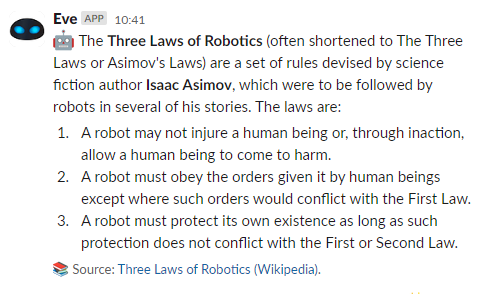
slack_info = 'A robot *may not injure a human being* or, through inaction, allow a human being to come to harm. <{}|First law of Robotics>.'.format(wiki_link)

response = post_message_to_slack(slack_info, unfurl_links = False)
It will look like this:

Help, my custom username is not showing?!
Slack did some changes, so your bot / integration needs to have the chat:write.customize permission. If it does not have that permission the username and icon of the bot are shown.
How about blocks?
I. Love. Block. Kit. It allows us to build complex messages, like this:
You can design block kit messages in the Block Kit Builder. I use Python objects to generate the blocks. A block-message can be sent by like this:
wiki_link = "https://en.wikipedia.org/wiki/Three_Laws_of_Robotics#:~:text=A%20robot%20may%20not%20injure%20a%20human%20being%20or%2C%20through%20inaction%2C%20allow%20a%20human%20being%20to%20come%20to%20harm."
slack_info = 'A robot *may not injure a human being* or, through inaction, allow a human being to come to harm. <{}|First law of Robotics>.'.format(wiki_link)

response = post_message_to_slack(slack_info, unfurl_links = False)
How about files?
Slack deprecated the file.upload API, so we need to use the new API. Unfortunately, it does not support the username and icon_url properties.
import requests

def post_file_to_slack(text, file_name, file_bytes, snippet_type=None, title=None):

    # Step 1: Get upload URL and file ID
    upload_url_data = requests.post('https://slack.com/api/files.getUploadURLExternal', {
        'token': slack_token,
        'filename': file_name,
        'length': len(file_bytes),
        'snippet_type': snippet_type
    }).json()

    if not upload_url_data.get('ok'):
        raise Exception(f"Failed to get upload URL: {upload_url_data.get('error')}")

    upload_url = upload_url_data['upload_url']
    file_id = upload_url_data['file_id']

    # Step 2: Upload the file to the provided URL
    requests.post(
        upload_url,
        files  = { 'file': file_bytes },
    )

    # Step 3: Complete the file upload
    complete_upload_data = requests.post('https://slack.com/api/files.completeUploadExternal',
        headers={
            'Authorization': f'Bearer {slack_token}',
            'Content-Type': 'application/json; charset=utf-8'
        },
        json={
            'files': [{ 'id': file_id, 'title': title or file_name }],
            'channel_id': slack_channel_id,
            'initial_comment': text,
    }).json()

    if not complete_upload_data.get('ok'):
        raise Exception(f"Failed to complete file upload: {complete_upload_data.get('error')}")

    return complete_upload_data
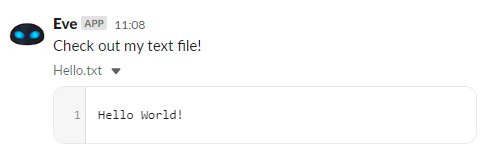
It makes sending text files super easy:
response = post_file_to_slack(
    'Check out my text file!',
    'Hello.txt',
    'Hello World!')
Which is displayed like this:
Sending binary data is easy. This code downloads the image URL and passes the bytes on to the function:
import urllib.request

# download image
image = "https://townsquare.media/site/442/files/2018/06/wall-e-eve.jpg"
response = urllib.request.urlopen(image)
data = response.read()

# send to slack
response = post_file_to_slack(
  ':palm_tree: Amazing day with *WALL-E*. Check out this photo! :sparkles:',
  'wall-e-and-eve-wallpaper-2.jpg',
  data,
  title="Day at the beach!")
Which looks like this:

Debugging
The Slack API works a little different from other APIs. When a request is invalid, it returns an HTTP 200 with a JSON error message. Because all of our methods return the JSON value, debugging is easy! Just print out the result:
print(post_blocks_to_slack("What is the matter with you!?", {}))This will tell you all you need to know:
{'ok': False, 'error': 'invalid_blocks_format'}Scripts: BASH me?
Some people use Python in their scripting. If you are writing a BASH script, you don't HAVE to use Python to send something to Slack. Just use the following BASH function to send a text via cURL to Slack:
#!/bin/bash
function post_message_to_slack() {
    # Parameters:
    # $1 is the slack channel, should start with a #
    # $2 is the text message

    local slack_token='xoxb-'
    local slack_icon_url='https://encrypted-tbn0.gstatic.com/images?q=tbn:ANd9GcTuGqps7ZafuzUsViFGIremEL2a3NR0KO0s0RTCMXmzmREJd5m4MA&s'
    local slack_user_name='Double Images Monitor'
    local slack_channel="$1"
    local text="$2"

    curl --request POST \
         --data-urlencode "token=$slack_token" \
         --data-urlencode "channel=$slack_channel" \
         --data-urlencode "icon_url=$slack_icon_url" \
         --data-urlencode "username=$slack_user_name" \
         --data-urlencode "text=$text" \
         'https://slack.com/api/chat.postMessage' \
         -w "\n"
}
You can now use it like this:
post_message_to_slack "#chatops-tests" "To be, or not to be! 🤔"Conclusion
Slack API. Is. Super. Simple. So... you don't really need a package to post a message to a Slack channel. Adding messages to your Python scripts and applications will give your end-users a richer experience. That's why I love ChatOps.
After thought: you might want to consider to just add a simple web hook.
The code is on GitHub, so check it out: code gallery / 9. simple slack messages.
Improvements
- Added the application manifest and implemented the new
getUploadURLExternalAPI for uploading files. - Added the webhook link.
- Added the Help, my icons are not showing?! section. Also I swapped the icon URL out for a Slack emoji, which has way better security.
- Formatting / highlighting of the code.
- Added a pure BASH/cURL example.
- Merged sending of blocks and sending of text messages.
- Added
.json()returns for all methods to support better debugging. Added debugging section. Added support for blocks. - Added support for files.
Would there be a way to use the user token? I couldn’t find a way to get my user token.
I’m not sure, I always use bot tokens in my applications. The docs (https://api.slack.com/methods/chat.postMessage) say that a user token should be able to do the same operation.
how do I notify someone inside the message? Tried @username and <@username>, but neither worked =/
What worked for me was:
slack_info = ‘Hello world! <@kbakker>‘
post_message_to_slack(slack_info)
My usename (@kbakker) is not the same as my display name (@kz). It prints the following in my Slack: https://uploads.disquscdn.com/images/c4b338c2edb63673a2270a6ab3f7a1aaf6a69a4895e750f4cfa8bd8a3482bc78.png
How do i send message to a user instead of a channel ?
OP, I would like to say a big thank you for sharing these codes :)
Hi! How would we possibly send @Channel notifications in this? I tried the recommendation you put lower @keescbakker:disqus , but it only worked for individual users.
Additionally, can we use this to call another slash command? Say I want to use a slash command called /exports that checks for how many people updated their files. Is there a mechanism that allows that to be passed, and read by the client in a way that the slash command executes as if i had typed it in?
Thank you for this article and information!!!
As far as I know “@channel” and “@here” can only be invoked by users that are in the chat. The same goes for slash commands.