

I really love that tiny Generate Commit Message button in the VS Code interface, but I like my commit messages to us a different commit style, using prefixes like "feat:" and "chore:". Let's see if we can wire up the git-commit skill (made by GitHub) to our project, so the AI generates even better messages.
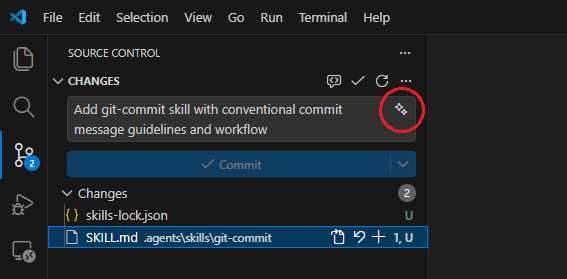
The beauty of skills is that installing one just makes it work. Copilot picks it up in the chat window automatically. Great! Unfortunately, this is not the case for the little Generate Commit Message button (the sparkles icon). You'll need to add some of your own magic to make it use the skill.
Let's Give the Sparkle Button a Skill
First, we'll need to install the skill into our project, because we need to reference it:
npx skills add https://github.com/github/awesome-copilot --skill git-commit --agent universal -yThis installs the SKILL.md markdown file in the .agents directory and creates a skills-lock.json file.
Next, we'll need to reference the file in our .vscode/settings.json by adding the following configuration:
{
  "github.copilot.chat.commitMessageGeneration.instructions": [
    {
      "file": ".agents/skills/git-commit/SKILL.md"
    }
  ]
}
That's it! When you press the button, it uses the skill to generate a better commit message.
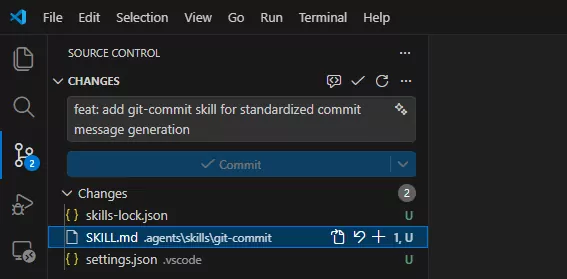
feat: prefix.Automate it
If you need a more automated approach, use one of these scripts.
Bash
(
  if ! command -v jq >/dev/null 2>&1; then
    echo "jq is required but not installed."
    return
  fi

  if ! command -v npx >/dev/null 2>&1; then
    echo "npx is required but not installed."
    return
  fi

  if [ ! -f ".agents/skills/git-commit/SKILL.md" ]; then
    npx skills add https://github.com/github/awesome-copilot --skill git-commit --agent universal -y
  fi

  mkdir -p .vscode

  [ -f .vscode/settings.json ] || echo '{}' > .vscode/settings.json

  if jq -e '.["github.copilot.chat.commitMessageGeneration.instructions"][]?.file == ".agents/skills/git-commit/SKILL.md"' \
        .vscode/settings.json >/dev/null 2>&1; then
    echo "Skill already configured."
    return
  fi

  jq '.["github.copilot.chat.commitMessageGeneration.instructions"] =
        ((.["github.copilot.chat.commitMessageGeneration.instructions"] // [])
        + [{ "file": ".agents/skills/git-commit/SKILL.md" }])' \
      .vscode/settings.json > .vscode/settings.tmp \
      && mv .vscode/settings.tmp .vscode/settings.json
)
Powershell
& {
  if (-not (Get-Command jq -ErrorAction SilentlyContinue)) {
    Write-Host "jq is required but not installed."
    return
  }

  if (-not (Get-Command npx -ErrorAction SilentlyContinue)) {
    Write-Host "npx is required but not installed."
    return
  }

  if (-not (Test-Path ".agents/skills/git-commit/SKILL.md")) {
    npx skills add https://github.com/github/awesome-copilot --skill git-commit --agent universal -y
  }

  New-Item -ItemType Directory -Force -Path ".vscode" | Out-Null

  if (-not (Test-Path ".vscode/settings.json")) {
    '{}' | Set-Content ".vscode/settings.json" -Encoding utf8
  }

  $exists = jq -e '.["github.copilot.chat.commitMessageGeneration.instructions"][]?.file == ".agents/skills/git-commit/SKILL.md"' `
               ".vscode/settings.json" 2>$null

  if ($LASTEXITCODE -eq 0) {
    Write-Host "Skill already configured."
    return
  }

  jq '.["github.copilot.chat.commitMessageGeneration.instructions"] =
        ((.["github.copilot.chat.commitMessageGeneration.instructions"] // [])
        + [{ "file": ".agents/skills/git-commit/SKILL.md" }])' `
        ".vscode/settings.json" |
        Set-Content ".vscode/settings.json" -Encoding utf8
}
Further reading
While working on this blog, I've found some resources that might interest you.
- skills.sh - here you'll find a store of skills you might want to install.
- The git-commit skill made by GitHub.
- agentskills.io - about the skills format.
- Evaluating AGENTS.md: Are Repository-Level Context Files Helpful for Coding Agents? - some research warning about the use of context files for your agents.