

There is so much fun stuff you can do with Home Assistant. I like the fact that you can build a personal dashboard to monitor all sorts of things. So why not track fuel prices in your region? Yesterday I built this card to show the price of E10 at my favourite fuel stations:
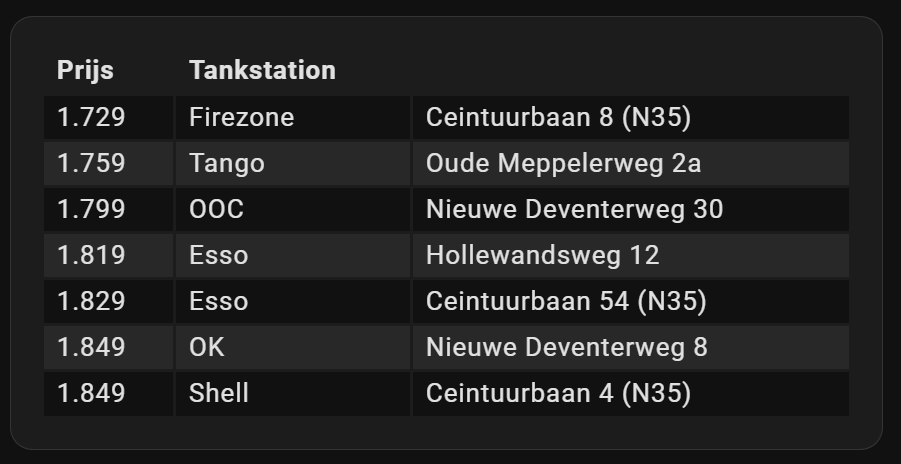
The plan
So what do we need?
- ha-fuelprices - this will import the fuel prices. These countries are supported.
- Flex Table Card - this will show the table.
- Auto-entities - this will gather the "right" fuel stations.
After installing the integration and downloading the UI elements, we'll add a card to the dashboard.
Installation
First, you'll need to add the ha-fuelprices as a custom repository to HACS:
- Click HACS
- Top right hamburger menu > Custom repositories
- Repository: https://github.com/pantherale0/ha-fuelprices
- Type: Integration
- Click the Add button
Next, you'll need to download the integration:
- Click HACS
- Search for Fuel Prices
- Click right hamburger menu > Download
- We're going to do the same for two UI elements we'll need. Search and download: Flex Table and auto-entities
- You probably need to restart Home Assistant.
Now, you'll need to initialize the integration:
- Click Settings in the right menu
- Click Devices & Services
- Click on the Add Integration button in the bottom left corner
- Search for Fuel Prices and click the integration.
- Complete the wizard.
I set the refresh time to 120 minutes instead of 1440 minutes (1 day). This will give more frequent updates.
Building the fuel card
We're now ready to add the card to your dashboard. Click the bottom right Add Card button in your dashboard. Search for the card named auto-entities. Click on the button Show Code Editor and paste the following YML:
type: custom:auto-entities
filter:
  include:
    - integration: fuel_prices
      attributes:
        postal_code: /^(8014[A-Z]{2}|8024AB|8024AA)$/
  exclude: []
sort:
  method: attribute
  attribute: E10
  reverse: false
  numeric: true
card:
  type: custom:flex-table-card
  columns:
    - data: E10
      name: Price
    - data: brand
      name: Name
    - data: address
      name: ''
Looks simple right? Observe the following:
- To show the "right" fuel stations, I use a regular expression that filters on postal codes. You might want to filter on different fields.
- I'm only interested in the price of E10, but you might be looking for B7, LPG, E5, or CNG.
- The address field does not have a heading to keep things clean.
And that's it! Enjoy.