

At Wehkamp we've been using ASP.NET for a long time. Containers brought .NET with us to our microservices architecture. We used a shell script in a special build container to build our service. Today we'll discuss how we turned that shell script into a multi stage build Dockerfile.
The script came a long way. I've found myself changing the Dockerfile for projects, so I created a small generator to generate the Dockerfile, check Dockerfile Generator for .NET. It has some configuration options as well.
Goals
With the new setup we have some goals in mind:
- Reproducibility — it should be on my machine as it is in the pipeline. It would be great if I can just do a
docker build .and everything should start building as it does in Jenkins. - Cacheability — Docker uses layers, which greatly speeds up the system. When we do a restore as a set of layers, we don't need to generate network traffic repeatedly.
- Upgradability — the current solution will focus on .NET 7.0, but we need things to be easily upgradable to a newer (or older) version of .NET.
- Readability — the Dockerfile should be treaded as a DevOps manifest, showing how to build and run our application. Let's make sure people understand what's going on. But also the output that Docker shows in the terminal should be easy to read and understand.
- Multiple projects support — we may ship multiple projects (2 APIs and a console app), so we need to have support to publish them with the container.
- Dev container support — some tests run better with test containers, let's support them with an integration test stage.
If at some point we can add security to the Dockerfile, that would also be great.
Project structure
Most of what we do is based on convention. Our project structure reflects those conventions:
.
├── src/
│   └── Ktt.Prime.Service.Api/
│       ├── Ktt.Prime.Service.Api.csproj
│       └── ...
├── test/
│   └── Ktt.Prime.Service.Api.UnitTests/
│       ├── Ktt.Prime.Service.Api.UnitTests.csproj
│       └── ...
├── .dockerignore
├── .gitignore
├── Ktt.Prime.Service.sln
├── Dockerfile
└── nuget.config
It is important that the name of the C# project directory matches the name of the C# project file.
Step 1: Configuration with global arguments
Our Dockerfile may grow. Let's make it easy to upgrade and changing global settings by using ARG instructions. We will use these arguments in the build and runtime images.
ARG MAIN_API_NAME="Ktt.Prime.Service.Api"
ARG \
   MAIN_API_DLL="$MAIN_API_NAME.dll" \
   PROJECTS_TO_PUBLISH="$MAIN_API_NAME" \
   PORT=5000 \
   ASPNET_VERSION="8.0" \
   # options: q[uiet], m[inimal], n[ormal], d[etailed], and diag[nostic]
   # minimal keeps your pipeline readable while informing you what's going on
   VERBOSITY="minimal" \
   APP_DIR="/app" \
   TAG="" \
   EXECUTE_TESTS="true"
Let's construct the project and DLL names by convention. To make debugging easier, we set the VERBOSITY argument centrally. We find that the minimal settings is a great default, as it just gives enough output to understand what's going on.
Our CI fills the TAG with the tag of the Docker image that is being built.
The PROJECTS_TO_PUBLISH can be filled with multiple projects, like PROJECTS_TO_PUBLISH="$MAIN_API_NAME Ktt.Prime.Job". All matching projects will be published and ship with this container.
Step 2: Build stage
Now that we have the arguments in place, let's start with the beginning of our build image. We use the standard SDK provided by Microsoft. We don't feel the need to share telemetry and we would like to have our times in local Amsterdam time.
##########################################################################
# Build image, uses VERBOSITY, EXECUTE_TESTS, PROJECTS_TO_PUBLISH, APP_DIR
##########################################################################

FROM mcr.microsoft.com/dotnet/sdk:$ASPNET_VERSION AS build

ARG VERBOSITY EXECUTE_TESTS PROJECTS_TO_PUBLISH APP_DIR

ENV \
   TZ=Europe/Amsterdam \
   DOTNET_CLI_TELEMETRY_OPTOUT=true \
   DOTNET_NOLOGO=true

WORKDIR /build
Notice how we're not defining the value of argument here (like VERBOSITY). If we would, we would lose our Docker layer caching ability when a new tag is used or when testing is switched off.
2.1 Restore in cacheable layers
In our old script we just executed a dotnet restore as part of the build script, which is fine, but nothing is cached by Docker. Our build script will take longer than necessary. Andrew Lock did an excellent job of writing a solution that makes the restore cacheable, so let's use his solution:
# Let's restore the solution, nuget and project files and do a restore
# in cacheable layers. This will speed up the build process greatly

# copy global files to restore
COPY *.sln *.*config ./

# copy src files to restore
COPY src/*/*.csproj ./
RUN for file in $(ls *.csproj); do mkdir -p src/${file%.*}/ && mv $file src/${file%.*}/; done

# copy test files to restore
COPY test/*/*.csproj ./
RUN for file in $(ls *.csproj); do mkdir -p test/${file%.*}/ && mv $file test/${file%.*}/; done; \
   echo "" \
   && echo "---------" \
   && echo "RESTORING" \
   && echo "---------" \
   && echo "" \
   && dotnet restore --verbosity "$VERBOSITY" || exit 1
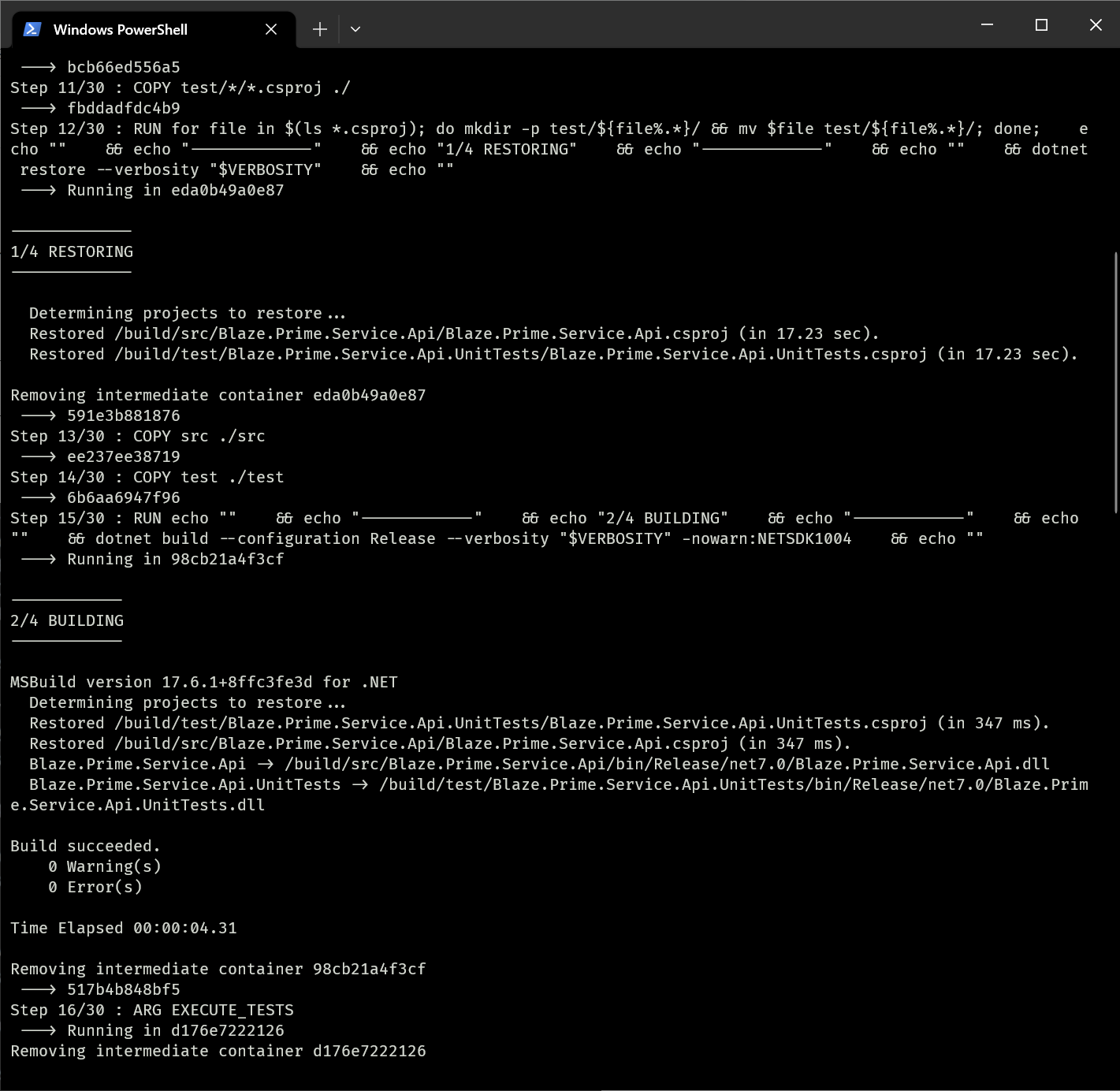
This method restores the project structure and makes the dotnet restore operation cacheable.
Notice how we are using echo to make our output more readable?
2.2 The build script
Now what should we copy? The base files like the solution and the NuGet config are already in there. Let's copy src and test only. This will help us cache builds that are triggered just because some documentation was changed (outside of the directory).
# copy dirs that are only needed for building and testing
COPY src ./src
COPY test ./test

# Note on build: don't use --no-restore, sometimes certain packages cannot be
# restored by the dotnet restore. The build will add them, as it has more context (!?)
# example: Package System.Text.Json, version 6.0.0 was not found

RUN echo "" \
   && echo "--------" \
   && echo "BUILDING" \
   && echo "--------" \
   && echo "" \
   && dotnet build --configuration Release --verbosity "$VERBOSITY" -nowarn:NETSDK1004 || exit 1
2.3 Optional testing
At the top of our Dockerfile, we've defined the arguments named EXECUTE_TESTS. Let's use it to test if we should do any testing. You might want to be able to skip testing to run faster locally.
# defining the argument here caches the previous layers when the value switches
ARG EXECUTE_TESTS
RUN echo "" \
   && echo "-------" \
   && echo "TESTING" \
   && echo "-------" \
   && echo ""; \
   if [ "$EXECUTE_TESTS" = "true" ]; then \
      dotnet test --filter "Category!=Integration" --configuration Release --logger "console;verbosity=$VERBOSITY" --no-build || exit 1; \
   else \
      echo "Skipping unit tests"; \
   fi;
Notice the --filter "Category!=Integration". This is the way we distinguish between tests that need test containers and other tests.
2.4 Publishing
Now that we're done testing, we can publish.
# publish project(s)
RUN echo "" \
   && echo "----------" \
   && echo "PUBLISHING" \
   && echo "----------" \
   && echo ""; \
   for project in $PROJECTS_TO_PUBLISH; do \
      echo "Publishing $project..."; \
      dotnet publish "src/$project/$project.csproj" \
        --configuration Release \
        --output "$APP_DIR/$project" \
        --no-restore -nowarn:NETSDK1004 || exit 1; \
   done
We're only publishing projects specified by PROJECTS_TO_PUBLISH.
Step 3: integration testing stage
Let's include a step for integration testing using test containers. We'll create a special stage for it:
########################
# Integration test image
########################

FROM mcr.microsoft.com/dotnet/sdk:$ASPNET_VERSION AS integration-test

ENV \
   TZ=Europe/Amsterdam \
   DOTNET_CLI_TELEMETRY_OPTOUT=true \
   DOTNET_NOLOGO=true

WORKDIR /build

# install Docker
RUN apt-get update && \
    apt-get install -y --no-install-recommends docker.io procps && \
    rm -rf /var/lib/apt/lists/*

# copy entire build context
COPY --from=build /build /build

# run Docker daemon and tests
CMD bash -euo pipefail -c '\
  trap "echo Shutting down dockerd; pkill dockerd || true" EXIT; \
  echo "Starting Docker daemon..."; \
  dockerd > /var/log/dockerd.log 2>&1 & \
  for i in {1..30}; do \
    docker info > /dev/null 2>&1 && break || echo "Waiting for Docker... ($i/30)"; sleep 1; \
  done; \
  if ! docker info > /dev/null 2>&1; then \
    echo "❌ Docker failed to start. Log output:"; cat /var/log/dockerd.log || echo "(No log found)"; exit 1; \
  fi; \
  echo "✅ Docker is ready. Running integration tests..."; \
  dotnet test --filter "Category=Integration" --nologo --logger "console;verbosity=${VERBOSITY:-minimal}"'
So this container is basically the SDK + docker and pkill. We need to launch the container to start the tests. It cannot be done during build, as we're not allowed to spin up new containers. Now, when the container is launched, the following happens:
- A trap is created to shut down docker when the script fails or is done.
- The docker daemon is started.
- A
dotnet testis triggered for--filter "Category=Integration", so only the integration tests are triggered.
How to run the integration tests?
The tests can be triggered like this:
Bash
#!/usr/bin/env bash
set -euo pipefail

imageName="ktt-docker-todo"
integrationImage="$imageName-integration-test"

echo -e "\n🔨 Building integration test image: $integrationImage\n"
if ! docker buildx build --target integration-test -t "$integrationImage" .; then
    echo "❌ Failed to build integration test image."
    exit 1
fi

echo -e "\n🚀 Running integration tests in: $integrationImage\n"
if ! docker run --rm --privileged "$integrationImage"; then
    echo "❌ Integration tests failed."
    exit 1
fi

echo -e "\n📦 Building final image: $imageName\n"
if ! docker buildx build -t "$imageName" .; then
    echo "❌ Failed to build final image."
    exit 1
fi

echo -e "\n✅ Done\n"
Powershell
$ErrorActionPreference = "Stop"

$imageName = "ktt-docker-todo"
$integrationImage = "$imageName-integration-test"

Write-Host "`n🔨 Building integration test image: $integrationImage`n"
docker buildx build --target integration-test -t $integrationImage .
if ($LASTEXITCODE -ne 0) {
    Write-Error "❌ Failed to build integration test image."
    exit $LASTEXITCODE
}

Write-Host "`n🚀 Running integration tests in: $integrationImage`n"
docker run --rm --privileged $integrationImage
if ($LASTEXITCODE -ne 0) {
    Write-Error "❌ Integration tests failed."
    exit $LASTEXITCODE
}

Write-Host "`n📦 Building final image: $imageName`n"
docker buildx build -t $imageName .
if ($LASTEXITCODE -ne 0) {
    Write-Error "❌ Failed to build final image."
    exit $LASTEXITCODE
}

Write-Host "`n✅ Done`n"
Step 4: runtime stage
The hard part is over: we have our application built. But there are still some choices to make!
4.1 Which runtime base image should we use?
So what runtime image are we going to use? We've built the entire project and checked the size of each resulting image:
| Base image | Total output size |
|---|---|
| mcr.microsoft.com/dotnet/aspnet:7.0 | 218MB |
| mcr.microsoft.com/dotnet/nightly/aspnet:7.0-jammy-chiseled | 114MB |
| mcr.microsoft.com/dotnet/aspnet:7.0-alpine | 112MB |
Looks like the chiseled project is very promising, as it promises a secure and minimal Debian image, but they have not released it for .NET 7. Most of our projects will run fine on Alpine.
4.2 Go self contained or not?
If you want to go even smaller, you can go to a self contained (and trimmed) application. It is a great way to limit the attack surface even further and a will result in an even smaller image (which is also great). But there are some caveats: your application may take longer to boot and you can't cache your ASP.NET dependencies, so there might be some more network traffic involved. For now we just stick with the old adage as we try to read more on what the best way forward is.
4.3 The final runtime image
We've decided on Alpine for now, so our runtime image looks like this:
#####################################################################
# Runtime image, uses PORT, TAG, MAIN_API_DLL, MAIN_API_NAME, APP_DIR
#####################################################################

FROM mcr.microsoft.com/dotnet/aspnet:$ASPNET_VERSION-alpine as runtime

RUN apk add --no-cache icu-libs krb5-libs libgcc libintl libssl3 libstdc++ zlib tzdata

ARG PORT MAIN_API_NAME APP_DIR MAIN_API_DLL TAG

WORKDIR $APP_DIR
COPY --from=build $APP_DIR .

# create a new user and change directory ownership
RUN adduser --disabled-password \
   --home "$APP_DIR" \
   --gecos '' dotnetuser && chown -R dotnetuser:dotnetuser "$APP_DIR"

# impersonate into the new user
USER dotnetuser

ENV \
   ASPNETCORE_URLS=http://*:$PORT \
   ASPNETCORE_ENVIRONMENT=Production \
   TZ=Europe/Amsterdam \
   DOTNET_CLI_TELEMETRY_OPTOUT=true \
   DOTNET_SYSTEM_GLOBALIZATION_INVARIANT=false

EXPOSE $PORT

WORKDIR "$APP_DIR/$MAIN_API_NAME"

ENV PROGRAM="$MAIN_API_DLL"
ENTRYPOINT dotnet "$PROGRAM"
For security reasons, we create a new user, so we don't run as root.
All together
When we put it all together, we get the following Dockerfile:
#################################
# Configuration settings (v2.2.2)
#################################

ARG MAIN_API_NAME="tt.Prime.Service.Api"
ARG \
   MAIN_API_DLL="$MAIN_API_NAME.dll" \
   PROJECTS_TO_PUBLISH="$MAIN_API_NAME" \
   PORT=5000 \
   ASPNET_VERSION="8.0" \
   # options: q[uiet], m[inimal], n[ormal], d[etailed], and diag[nostic]
   # minimal keeps your pipeline readable while informing you what's going on
   VERBOSITY="minimal" \
   APP_DIR="/app" \
   TAG="" \
   EXECUTE_TESTS="true"


##########################################################################
# Build image, uses VERBOSITY, EXECUTE_TESTS, PROJECTS_TO_PUBLISH, APP_DIR
##########################################################################

FROM mcr.microsoft.com/dotnet/sdk:$ASPNET_VERSION AS build

ARG VERBOSITY EXECUTE_TESTS PROJECTS_TO_PUBLISH APP_DIR

ENV \
   TZ=Europe/Amsterdam \
   DOTNET_CLI_TELEMETRY_OPTOUT=true \
   DOTNET_NOLOGO=true

WORKDIR /build

# Let's restore the solution, nuget and project files and do a restore
# in cacheable layers. This will speed up the build process greatly

# copy global files to restore
COPY *.sln *.*config ./

# copy src files to restore
COPY src/*/*.csproj ./
RUN for file in $(ls *.csproj); do mkdir -p src/${file%.*}/ && mv $file src/${file%.*}/; done

# copy test files to restore
COPY test/*/*.csproj ./
RUN for file in $(ls *.csproj); do mkdir -p test/${file%.*}/ && mv $file test/${file%.*}/; done; \
   echo "" \
   && echo "---------" \
   && echo "RESTORING" \
   && echo "---------" \
   && echo "" \
   && dotnet restore --verbosity "$VERBOSITY" || exit 1

# copy dirs that are only needed for building and testing
COPY src ./src
COPY test ./test

# Note on build: don't use --no-restore, sometimes certain packages cannot be
# restored by the dotnet restore. The build will add them, as it has more context (!?)
# example: Package System.Text.Json, version 6.0.0 was not found

RUN echo "" \
   && echo "--------" \
   && echo "BUILDING" \
   && echo "--------" \
   && echo "" \
   && dotnet build --configuration Release --verbosity "$VERBOSITY" -nowarn:NETSDK1004 || exit 1

# defining the argument here caches the previous layers when the value switches
ARG EXECUTE_TESTS
RUN echo "" \
   && echo "-------" \
   && echo "TESTING" \
   && echo "-------" \
   && echo ""; \
   if [ "$EXECUTE_TESTS" = "true" ]; then \
      dotnet test --filter "Category!=Integration" --configuration Release --logger "console;verbosity=$VERBOSITY" --no-build || exit 1; \
   else \
      echo "Skipping unit tests"; \
   fi;

# publish project(s)
RUN echo "" \
   && echo "----------" \
   && echo "PUBLISHING" \
   && echo "----------" \
   && echo ""; \
   for project in $PROJECTS_TO_PUBLISH; do \
      echo "Publishing $project..."; \
      dotnet publish "src/$project/$project.csproj" \
        --configuration Release \
        --output "$APP_DIR/$project" \
        --no-restore -nowarn:NETSDK1004 || exit 1; \
   done


########################
# Integration test image
########################

FROM mcr.microsoft.com/dotnet/sdk:$ASPNET_VERSION AS integration-test

ENV \
   TZ=Europe/Amsterdam \
   DOTNET_CLI_TELEMETRY_OPTOUT=true \
   DOTNET_NOLOGO=true

WORKDIR /build

# install Docker
RUN apt-get update && \
    apt-get install -y --no-install-recommends docker.io procps && \
    rm -rf /var/lib/apt/lists/*

# copy entire build context
COPY --from=build /build /build

# run Docker daemon and tests
CMD bash -euo pipefail -c '\
  trap "echo Shutting down dockerd; pkill dockerd || true" EXIT; \
  echo "Starting Docker daemon..."; \
  dockerd > /var/log/dockerd.log 2>&1 & \
  for i in {1..30}; do \
    docker info > /dev/null 2>&1 && break || echo "Waiting for Docker... ($i/30)"; sleep 1; \
  done; \
  if ! docker info > /dev/null 2>&1; then \
    echo "❌ Docker failed to start. Log output:"; cat /var/log/dockerd.log || echo "(No log found)"; exit 1; \
  fi; \
  echo "✅ Docker is ready. Running integration tests..."; \
  dotnet test --filter "Category=Integration" --nologo --logger "console;verbosity=${VERBOSITY:-minimal}"'


#####################################################################
# Runtime image, uses PORT, TAG, MAIN_API_DLL, MAIN_API_NAME, APP_DIR
#####################################################################

FROM mcr.microsoft.com/dotnet/aspnet:$ASPNET_VERSION-alpine as runtime

RUN apk add --no-cache icu-libs krb5-libs libgcc libintl libssl3 libstdc++ zlib tzdata

ARG PORT MAIN_API_NAME APP_DIR MAIN_API_DLL TAG

WORKDIR $APP_DIR
COPY --from=build $APP_DIR .

# create a new user and change directory ownership
RUN adduser --disabled-password \
   --home "$APP_DIR" \
   --gecos '' dotnetuser && chown -R dotnetuser:dotnetuser "$APP_DIR"

# impersonate into the new user
USER dotnetuser

ENV \
   ASPNETCORE_URLS=http://*:$PORT \
   ASPNETCORE_ENVIRONMENT=Production \
   TZ=Europe/Amsterdam \
   DOTNET_CLI_TELEMETRY_OPTOUT=true \
   DOTNET_SYSTEM_GLOBALIZATION_INVARIANT=false

EXPOSE $PORT

WORKDIR "$APP_DIR/$MAIN_API_NAME"

ENV PROGRAM="$MAIN_API_DLL"
ENTRYPOINT dotnet "$PROGRAM"
Pretty cool, right?
The code is on GitHub, so check it out: code gallery / 7. docker.
Reading list
While studying the subject we found some interesting blogs to read:
- On security: How to build smaller and secure Docker Images for .NET
- On
dotnet restore& Docker optimizations: Optimising ASP.NET Core apps in Docker - avoiding manually copying csproj files (Part 2) - On the new Chiselled project: Chiselled Ubuntu: the perfect present for your containerised and cloud applications
- On Windows you might get the error "ERROR: failed to solve: error from sender: readdir: open src\*: The filename, directory name, or volume label syntax is incorrect." This is due to a bug in the Docker Moby BuildKit, which cannot handle the wildcards. On PowerShell you can execute
$env:DOCKER_BUILDKIT=0to disable BuildKit.
Changelog
- added the integration testing stage section.
- added support for
PROJECTS_TO_PUBLISHin order to ship multiple projects with your docker image. - some files were still owned by the root, now the
dotnetuserhas full rights. - use LTS .NET 8, upgrade libssl1.1 to libssl3, and set DOTNET_CLI_TELEMETRY_OPTOUT and DOTNET_NOLOGO to true.
- removed the section on compiling git info into the binary.
- installed the
tzdatapackage to fix timezone support. - notes on how to fix the Windows Docker error: "error from sender: readdir".
- nuget.config is now optional.
- make sure docker build exits on error.
- initial article.