

This week, we needed to update a .NET service that used an outdated security mechanism based on hashed message authentication code (HMAC) to protect privileged endpoints. To modernize it, we switched to JSON Web Tokens (JWT), making it more standardized. We also moved away from symmetric keys to asymmetric keys, using RSA256, improving the security. The best part? We completed the migration in just one day!
Special thanks to Rogier Wensink en Sander ten Brinke for collaborating on this project.
I've written and tested the code on .NET 8.
The idea
An image says more that a 1000 words, so this is what we want to do:
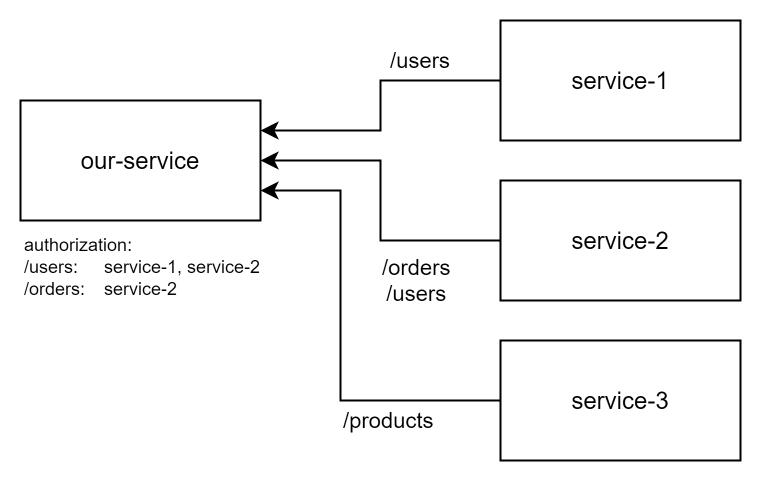
service-x needs to communicate with our-service, but some of our endpoints are restricted and can only be accessed by specific services. To achieve this, we need to do the following:
service-xuses its private key to generate a JWT token, which is then used as an authorization header on API requests. The token must also indicate the name of the service an issuer.our-servicemust have the public key ofservice-xto validate incoming JWT tokens.our-servicemaintains a map of policies that determine which services (issuers) can access which endpoints.- When a privileged endpoint is accessed,
our-servicechecks that:- A JWT token is present and valid.
- The issuer of the token is authorized to access the endpoint.
Config
Let's store the information in a .NET config file like this:
{
  "JwtSettings": {
    "ValidAudience": "our-service",
    "TrustedServices": {
      "service-1": "-----BEGIN PUBLIC KEY-----\nMIIBIjANBgkqh...\n-----END PUBLIC KEY-----",
      "service-2": "-----BEGIN PUBLIC KEY-----\nWVIcIiAMCgkpu...\n-----END PUBLIC KEY-----"
    },
    "AccessPolicies": {
      "orders": [ "service-1", "service-2" ],
      "users": [ "service-2" ]
    }
  }
}
The TrustedServices configuration contains a map of public keys. The key of each service will be used as an issuer (iss) in the JWT token. The AccessPolicies contain a map of policies and the issuers that may access them.
JWT payload
The decoded JWT will have a payload like this:
{
  "iss": "service-1",
  "aud": "our-service",
  "username": "tstusr"
}
Use Authorization and Policy in Controllers
We want to use the standard .NET claims-based authorization to restrict access to certain endpoints. Here is an example of what the controller code might look like:
using Microsoft.AspNetCore.Authorization;
using Microsoft.AspNetCore.Mvc;

[ApiController]
[Route("api/orders")]
public class OrdersController : ControllerBase
{
    [HttpGet]
    [Authorize(Policy = "orders")]
    public IActionResult GetOrders()
    {
        return Ok("Access granted to orders.");
    }
}

[ApiController]
[Route("api/users")]
public class UsersController : ControllerBase
{
    [HttpGet]
    [Authorize(Policy = "users")]
    public IActionResult GetUsers()
    {
        return Ok("Access granted to users.");
    }
}
The policy will specify a name that needs to match the keys of the AccessPolicies attribute. The system should validate if the supplied token is from an issuer that is allowed to access that policy.
You may add an Authorize to a specific method to secure an endpoint or to the entire class to protect all the endpoints of the controller.
Step 1: Configuration of JwtOptions
Let's convert the configuration section with our JWT settings into a JwtOptions object:
using System.ComponentModel.DataAnnotations;

public class JwtOptions
{
    public const string SectionName = "JwtSettings";

    [Required(AllowEmptyStrings = false)]
    public string ValidAudience { get; set; } = string.Empty;

    [MinLength(1)]
    public Dictionary<string, string> TrustedServices { get; } = [];

    public Dictionary<string, string[]> AccessPolicies { get; } = [];

    public bool SkipEmptyPublicKeys { get; set; }

    public Dictionary<string, string> GetTrustedServices()
    {
        if (!SkipEmptyPublicKeys)
        {
            return TrustedServices;
        }

        return TrustedServices
            .Where(kvp => !string.IsNullOrWhiteSpace(kvp.Value))
            .ToDictionary(kvp => kvp.Key, kvp => kvp.Value);
    }
}Let's implement our dependency injection in such a way that the option is validated at application start:
var builder = WebApplication.CreateBuilder(args);

void Configure<TConfig>(string sectionName) where TConfig : class, new()
{
    builder.Services
        .AddSingleton(p => p.GetRequiredService<IOptions<TConfig>>().Value)
        .AddOptionsWithValidateOnStart<TConfig>()
        .BindConfiguration(sectionName)
        .Validate(options =>
        {
            var results = new List<ValidationResult>();
            var context = new ValidationContext(options);
            if (!Validator.TryValidateObject(options, context, results, validateAllProperties: true))
            {
                 throw new OptionsValidationException(
                     sectionName,
                     typeof(TConfig),
                     results.Select(r => $"[{sectionName}] {r.ErrorMessage}")
                 );
             }
             return true;
        });
}

Configure<JwtOptions>(JwtOptions.SectionName);
To make the injection easier, we register both the IOptions<T> and T version of the settings. I find it makes my code easier to read if I don't need to inject IOptions<T> (and the .Value) everywhere.
ValidateOnStart is available since .NET 6, earlier versions will only validate when the option is being used. Read more on the blog of Andrew Lock.
Step 2: Add JWT to your project
First, install the Microsoft JwtBearer package:
dotnet add package Microsoft.AspNetCore.Authentication.JwtBearerNow we need to create 4 classes:
- A
JwtAuthenticationExtensionsclass that will bind everything together into our dependency injection. - A configurator for
JwtBearerOptionsthat helps us to validate JWT tokens. - This configurator needs an
RsaFactorythat will help to reuse RSA keys in our application. - A configurator for
AuthorizationOptionsthat helps us to validate the claims in the JWT tokens. It needs to make sure the username is filled and it will add the policy support.
2.1 Dependency injection
Let's start with the simplest class JwtAuthenticationExtensions:
using Microsoft.AspNetCore.Authentication.JwtBearer;
using Microsoft.AspNetCore.Authorization;
using Microsoft.Extensions.Options;

public static class JwtAuthenticationExtensions
{
    public static void AddJwtAndAccessPolicies(this IServiceCollection services)
    {
        services
            .AddSingleton<IPostConfigureOptions<JwtBearerOptions>, JwtBearerOptionsConfigurator>()
            .AddSingleton<IPostConfigureOptions<AuthorizationOptions>, AuthorizationOptionsConfigurator>()
            .AddSingleton<RsaFactory>()
            .AddAuthorization()
            .AddAuthentication(JwtBearerDefaults.AuthenticationScheme)
            .AddJwtBearer();
    }
}It uses IPostConfigureOptions to trigger the configuration of AddAuthorization and AddJwtBearer. We need this, because we want to inject the RsaFactory and IOptions<JwtOptions>.
2.2 The RSA factory
Our RSA factory is pretty straight forward: it takes the public keys specified by the TrustedServices and turns them into RSA keys. They will be used by the IssuerSigningKeyResolver to validate the JWT token.
using System.Collections.Concurrent;
using System.Diagnostics.CodeAnalysis;
using System.Security.Cryptography;

public sealed class RsaFactory : IDisposable
{
    private readonly ConcurrentDictionary<string, RSA> _keys = new ConcurrentDictionary<string, RSA>();

    public RsaFactory(JwtOptions jwtOptions)
    {
        var trustedServices = jwtOptions.GetTrustedServices();
        if (trustedServices.Count == 0)
        {
            throw new InvalidOperationException("TrustedServices section is missing or empty in configuration.");
        }

        foreach (var service in trustedServices.Keys)
        {
            var publicKeyPem = trustedServices[service];

            var rsa = RSA.Create();
            try
            {
                rsa.ImportFromPem(publicKeyPem);
            }
            catch (Exception ex)
            {
                throw new TrustedServiceImportPemException(service, ex);
            }
            _keys.TryAdd(service, rsa);
        }
    }

    public void Dispose()
    {
        foreach (var key in _keys.Values)
        {
            key.Dispose();
        }

        _keys.Clear();
    }

    public bool TryGetRsa(string issuer, [MaybeNullWhen(false)] out RSA rsa)
    {
        return _keys.TryGetValue(issuer, out rsa);
    }

    public class TrustedServiceImportPemException(string service, Exception innerException) : Exception($"TrustedServices key with {service} cannot import the PEM.", innerException)
    {
    }
}
Injecting the RsaFactory will make sure we reuse the RSA keys and it will make sure that any key is disposed at the right time in the lifecycle, preventing memory leaks. An early version made a new key for every validation.
2.3 Validate the JWT token
We'll use a configurator to extend JwtBearerOptions, so we can validate the JWT token. As multiple service may use our service, we need to resolve the right RSA key based on the issuer of the token.
using Microsoft.AspNetCore.Authentication.JwtBearer;
using Microsoft.Extensions.Options;
using Microsoft.IdentityModel.Tokens;

public class JwtBearerOptionsConfigurator(JwtOptions jwtOptions, RsaFactory rsaFactory) : IPostConfigureOptions<JwtBearerOptions>
{
    public void PostConfigure(string? name, JwtBearerOptions options)
    {
        var trustedServices = jwtOptions.GetTrustedServices();
        if (trustedServices.Count == 0)
        {
            throw new InvalidOperationException("TrustedServices section has configurations errors. No valid service key found.");
        }

        options.TokenValidationParameters = new TokenValidationParameters
        {
            ValidateIssuer = true,
            // The key of each trusted service is a valid issuer!
            ValidIssuers = trustedServices.Keys,
            ValidateAudience = true,
            ValidAudience = jwtOptions.ValidAudience,
            ValidateIssuerSigningKey = true,
            ValidateLifetime = true,
            ClockSkew = TimeSpan.Zero,
            IssuerSigningKeyResolver = (token, securityToken, kid, parameters) =>
            {
                // Resolve the public key dynamically for the issuer
                if (rsaFactory.TryGetRsa(securityToken.Issuer, out var rsa))
                {
                    return [new RsaSecurityKey(rsa)];
                }

                throw new SecurityTokenInvalidIssuerException("Invalid issuer.");
            }
        };
    }
}
2.4 Validate the (policy) claims
When the token is valid, we should validate if the token may access a certain part of the application. We're using another configurator to validate that we have a username and we'll add a policy for every AccessPolicy we have in our JwtSettings.
using Microsoft.AspNetCore.Authorization;
using Microsoft.Extensions.Options;

public class AuthorizationOptionsConfigurator(JwtOptions jwtOptions) : IPostConfigureOptions<AuthorizationOptions>
{
    public void PostConfigure(string? name, AuthorizationOptions options)
    {
        // Global policy: Ensure the username claim is present
        options.DefaultPolicy = new AuthorizationPolicyBuilder()
            .RequireAuthenticatedUser()
            .RequireAssertion(context =>
            {
                var usernameClaim = context.User.Claims.FirstOrDefault(c => c.Type == "username")?.Value;
                return !string.IsNullOrEmpty(usernameClaim);
            })
            .Build();

        // Configure (optional) Access Policies
        var accessPolicies = jwtOptions.AccessPolicies;
        if (accessPolicies.Count > 0)
        {
            foreach (var policyName in accessPolicies.Keys)
            {
                options.AddPolicy(policyName, policy =>
                {
                    policy.RequireAssertion(context =>
                    {
                        // Validate issuer (iss claim)
                        var issuerClaim = context.User.Claims.FirstOrDefault(c => c.Type == "iss")?.Value;

                        // Ensure the issuer is allowed for this policy
                        return accessPolicies[policyName].Contains(issuerClaim);
                    });
                });
            }
        }
    }
}
2.5 Add it to your application
Now, all you need to do is add it to your dependency injection configuration:
builder.Services.AddJwtAndAccessPolicies();

// and don't forget to add this between UseRouting and UseEndpoints:
app.UseAuthentication();
app.UseAuthorization();
Step 3: Access the username claim
The JWT token must include a username claim, and we may need to access it in the controller. Here's a simple mechanism to do that:
public interface IUserNameAccessor
{
    string? UserName { get; }
    string? Issuer { get; }
}

public class UserNameAccessor(IHttpContextAccessor contextAccessor) : IUserNameAccessor
{
    // Retrieve the username claim
    public string? UserName => contextAccessor.HttpContext?.User.FindFirst("userName")?.Value;

    // Retrieve the issuer claim
    public string? Issuer => contextAccessor.HttpContext?.User.FindFirst("iss")?.Value;
}
Add it to your dependency injection setup like this:
builder.Services.AddHttpContextAccessor();
builder.Services.AddTransient<IUserNameAccessor, UserNameAccessor>();
We can inject this into a controller:
using Microsoft.AspNetCore.Mvc;

[ApiController]
[Route("api/whoami")]
public class DebugController(IUserNameAccessor userNameAccessor) : ControllerBase
{
    [HttpGet]
    public IActionResult WhoAmI()
    {
        return Ok(new
        {
            userNameAccessor.UserName,
            userNameAccessor.Issuer
        });
    }
}
Bonus: a key generator
To secure our service with public tokens from other services, we can use a simple script to generate new RSA keys. This script will:
- Prompt you for the name of the service.
- Generate and display a private key that can be added as an environment variable (make sure to inject it securely into your application).
- Display the public key that can be added to your .NET configuration (in the
"service-name": "public-key"format). - Ask if you want to generate a new JWT token for debugging purposes.
Here is the script:
#!/bin/bash

# Exit on errors
set -e

echo
echo "This script helps to generate a public / private key for JWT tokens."
echo

# Prompt user for service name
read -p "Enter the name of the service (lower-kebab-case): " SERVICE_NAME

echo
echo "Generating key..."

# Generate RSA private key and public key in memory
PRIVATE_KEY=$(openssl genpkey -algorithm RSA -pkeyopt rsa_keygen_bits:2048)
PUBLIC_KEY=$(echo "$PRIVATE_KEY" | openssl rsa -pubout)

# Encode keys with \n
PRIVATE_KEY_ENCODED=$(echo "$PRIVATE_KEY" | sed ':a;N;$!ba;s/\n/\\n/g')
PUBLIC_KEY_ENCODED=$(echo "$PUBLIC_KEY" | sed ':a;N;$!ba;s/\n/\\n/g')

# Output public and private keys with \n encoding
echo
echo "Private Key:"
echo "$PRIVATE_KEY_ENCODED"
echo

echo "Public Key:"
echo "\"$SERVICE_NAME\": \"$PUBLIC_KEY_ENCODED\""
echo

# Ask user if they want to generate a sample token
read -p "Do you want to generate a sample token valid for 25 years? (yes/no): " GENERATE_TOKEN

if [[ "$GENERATE_TOKEN" == "yes" || "$GENERATE_TOKEN" == "y" ]]; then
    # Generate JWT token
    USER_NAME="tstusr"
    ISSUER="$SERVICE_NAME"
    AUDIENCE="our-service"
    EXP=$(($(date +%s) + 25 * 365 * 24 * 60 * 60)) # 25 years in seconds

    # Encode JWT header
    HEADER_BASE64=$(echo -n '{"alg":"RS256","typ":"JWT"}' | openssl base64 -e -A | tr '+/' '-_' | tr -d '=')

    # Encode JWT payload
    PAYLOAD=$(cat <<EOF
{
  "iss": "$ISSUER",
  "aud": "$AUDIENCE",
  "username": "$USER_NAME",
  "iat": $(date +%s),
  "exp": $EXP
}
EOF
    )

    PAYLOAD_BASE64=$(echo -n "$PAYLOAD" | openssl base64 -e -A | tr '+/' '-_' | tr -d '=')

    # Create unsigned token
    UNSIGNED_TOKEN="$HEADER_BASE64.$PAYLOAD_BASE64"

    # Sign the token using the private key in memory
    SIGNATURE=$(echo -n "$UNSIGNED_TOKEN" | openssl dgst -sha256 -sign <(echo "$PRIVATE_KEY") | openssl base64 -e -A | tr '+/' '-_' | tr -d '=')

    # Combine header, payload, and signature to form the JWT
    JWT="$UNSIGNED_TOKEN.$SIGNATURE"

    # Output the JWT
    echo "Generated JWT:"
    echo "$JWT"
    echo

    # Output the payload
    echo "JWT Payload:"
    echo "$PAYLOAD"
fi
Further reading
While working on this topic, I found some excellent sources for reading:
- TokenValidationParameters Class: read up on the details of how to validate JWT tokens in .NET.
- Claims-based authorization in ASP.NET Core: read up on claims based authorization in .NET.
- RS256 vs HS256: What's The Difference?: excellent resource on the difference between symmetric and asymmetric keys (for JWT tokens).
- Andrew Lock - Adding validation to strongly typed configuration objects in .NET 6: excellent writeup on how to implement the
IOptionspattern and how one can use validation at startup.
The code is on GitHub, so check it out: code gallery / 2. simple JWT access policies for API security in .NET.
Changelog
- Improved the validation exception with the name of the section for better discoverability.
- Code now aligns with Nullable enabled.
- Added a setting to allow public keys to be empty and skipped. The generator won't write files to disk.
- Added configurators and an
RsaFactoryto improve memory usage. - Initial article.