

Slack is fully awesom 🤩. At Wehkamp we use it for our internal communication and as a tool for our DevOps. The Slack API allows us to build even more advanced integrations. In this blog I'll explore how to use the API to create stuff like a powerful progress indicator, just by updating a Slack message:
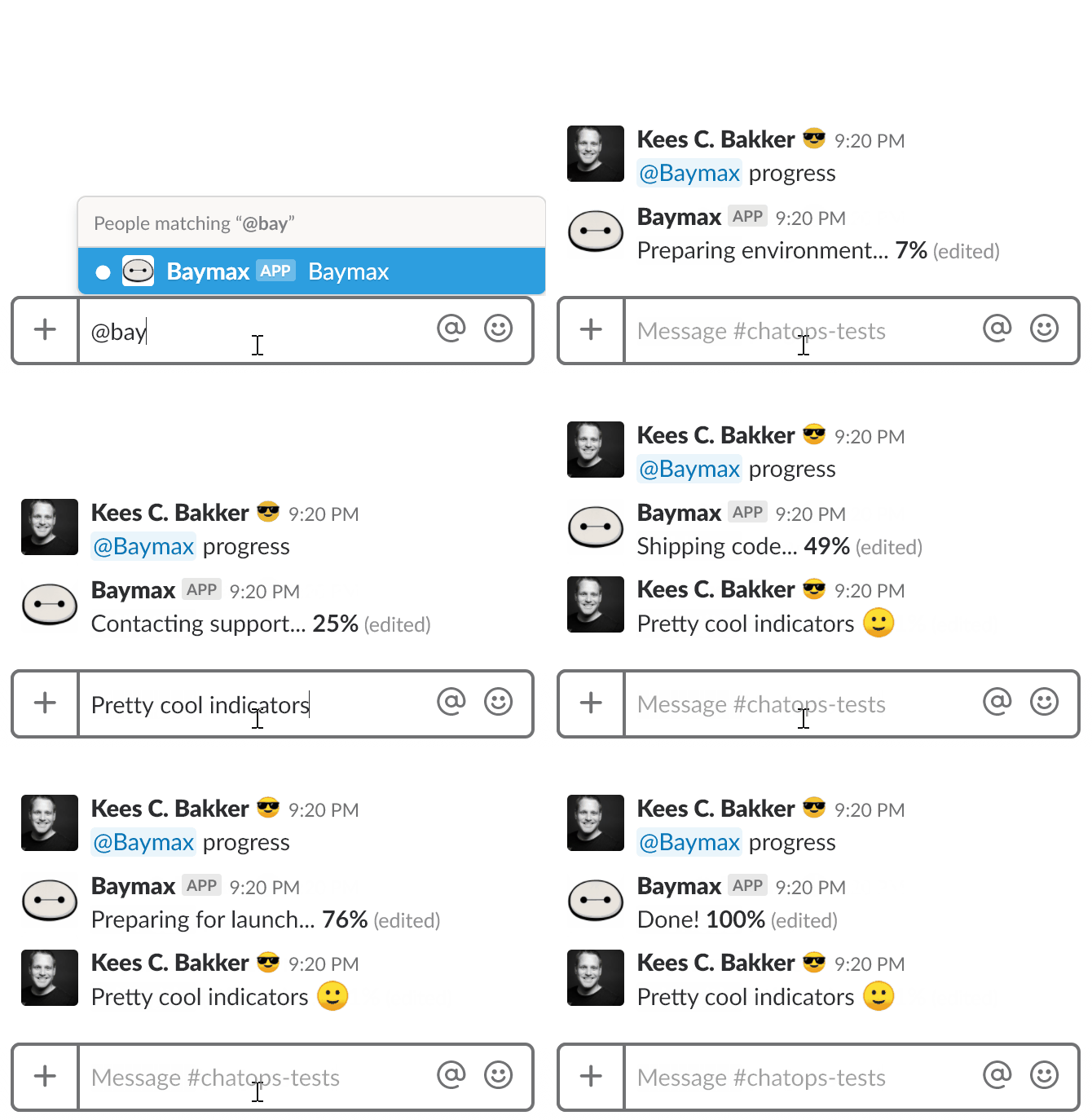
Imagine what you could build with this.
Note from 2022 2024
The first version of this article was written in 2018. We continue to use Slack bots in Node.js, but we've decided to use TypeScript now. We used to send text messages, but nowadays we richer messages using the Slack Block Kit. When you do, it no longer shows the (edited) in your messages.
I've update the article with the new links and code to keep it fresh.
Packages
We'll need to following NPM packages:
npm install @slack/web-api remove-markdownPromise the update
The Slack Web API has two methods we can use to either create or update messages:
- chat.postMessage - this will send a new message to the channel and give us a message identifier
ts. We will store and reuse it to update the message. - chat.update - this will update the message that corresponds to the
ts.
Let's create a function that does the creation or update:
import { ChatPostMessageArguments, ChatUpdateArguments, WebClient } from "@slack/web-api"

const isUpdate = (msg: ChatPostMessageArguments | ChatUpdateArguments): msg is ChatUpdateArguments => {
  return (msg as ChatUpdateArguments).ts !== undefined
}

function sendMessage(webClient: WebClient, msg: ChatPostMessageArguments | ChatUpdateArguments) {
  if (isUpdate(msg)) {
    return webClient.chat.update(msg)
  }

  return webClient.chat.postMessage(msg)
}
The function returns the message identifier as a promise. The only thing we need to do is save the message identifier and reuse it when calling the function.
Asynchronous problems
The first problem I ran into had to do with messages not arriving in the same order that I expected. Sometimes I ended up with an earlier message as end-result. And sometimes I wanted to send an update for a message that had not even been created yet. If we want to work asynchronously we need to synchronize the way we send messages.

Remember: only send 1 message at the time!
We need to build a class that will handle the process of sending messages. It will store the message identifier so we can update the message. The class should also make sure that only a single message is being send at the same time.
If a message is being send and a new message comes in, the class should store that new message and send it after the first message has been sent.
But what if a 3rd message comes in? We are only interested in sending the latest message, so we should only store the last message. A pattern like this prevents useless updates / excessive use of the Slack API. Be aware: rate limiting applies to the Slack API, so you might want to consider only updating the message once a second.
Class me!
It is easier to maintain state in a class. Let's build and UpdatableMessage to keep tabs on what's happening. To make things easier, we'll add support for strings and replies in threads:
import removeMarkDown from "remove-markdown"

export type Message = ChatPostMessageArguments | ChatUpdateArguments | string

export function isString(x: any): x is string {
  return typeof x === "string"
}

export function delay(ms: number): Promise<void> {
  return new Promise(r => {
    setTimeout(() => {
      r()
    }, ms)
  })
}

export class UpdatableMessage {
  private message?: Message
  private nextMessage?: Message
  private sending?: Promise<any>
  private isSending = false

  private _ts?: string

  constructor(
    private readonly webClient: WebClient,
    readonly channel: string,
    ts?: string,
    private readonly threadTs?: string
  ) {
    this._ts = ts
  }

  async waitForAllToBenSent() {
    if (this.sending) {
      await this.sending
      await delay(500)
    }

    return this.ts
  }

  async send(msg: Message): Promise<string | undefined> {
    // don't send empty or the same message
    if (!msg || msg === this.message) {
      return this.ts
    }

    // when sending, add to later
    if (this.isSending) {
      this.nextMessage = msg
      await Promise.resolve(this.sending)
      return this.ts
    }

    // save original message for comparison
    this.message = msg

    if (isString(msg)) {
      if (msg.length >= 3000) {
        msg = {
          text: msg,
          channel: this.channel
        }
      } else {
        msg = {
          channel: this.channel,
          blocks: [
            {
              type: "section",
              text: {
                type: "mrkdwn",
                text: msg
              }
            }
          ],
          text: removeMarkDown(msg)
        }
      }
    }

    // combine with fields for the message update
    msg = {
      // the previous message might have blocks,
      // add an empty element to make sure we clear
      // those previous blocks
      ...{ blocks: [] },
      ...msg,
      ...{
        ts: this.ts,
        channel: this.channel,
        as_user: true,
        thread_ts: this.threadTs || ""
      }
    } as any

    this.isSending = true
    this.sending = sendMessage(this.webClient, msg as any).then(x => {
      this._ts = this._ts || x.ts
      this.isSending = false

      const msg = this.nextMessage
      this.nextMessage = undefined
      return this.send(msg as any)
    })

    return await this.sending
  }

  get ts() {
    return this._ts
  }
}
By implementing a simple Boolean that checks if a message is being send, we solve most - if not all - of our asynchronous problems.
Note on Slack Block Kit
We're using the Slack Block Kit to send a text message, but turning it into a text section. The text field value is used by Slack to display a simple notification (on your PC or phone). We used the remove-markdown NPM package to strip markdown from the text.
Bot Zero
The UpdatableMessage class (with some additions is used by the progress script of the bot-zero project to show an example of a progress indicator. Go check it out and let us know what you think.

Changelog
- Refactored
getTsandgetChannelto propertsandchannelgetters. - Updated the code to reflect 2024 thinking. Lots of types are fixed in the @slack/web-api package, so I removed the types section.
- Updated the code to clear blocks from previous updates. Provided types to make sending complex (block kit) messages easier.
- Changed to code from JavaScript into TypeScript. The code now uses the Slack Block Kit and the Slack Web API.
- Initial article.