# Submenu navigation for category pages
**Date:** 2020-12-26
**Author:** Kees C. Bakker
**Categories:** PHP, WordPress
**Original:** https://keestalkstech.com/submenu-navigation-for-category-pages/
---
In WordPress you have two main taxonomies: categories and tags. I use categories as a taxonomy tree. That is why I want to show the submenu on the category page. It does not come out of the box, so I created something that renders the submenu items for me.
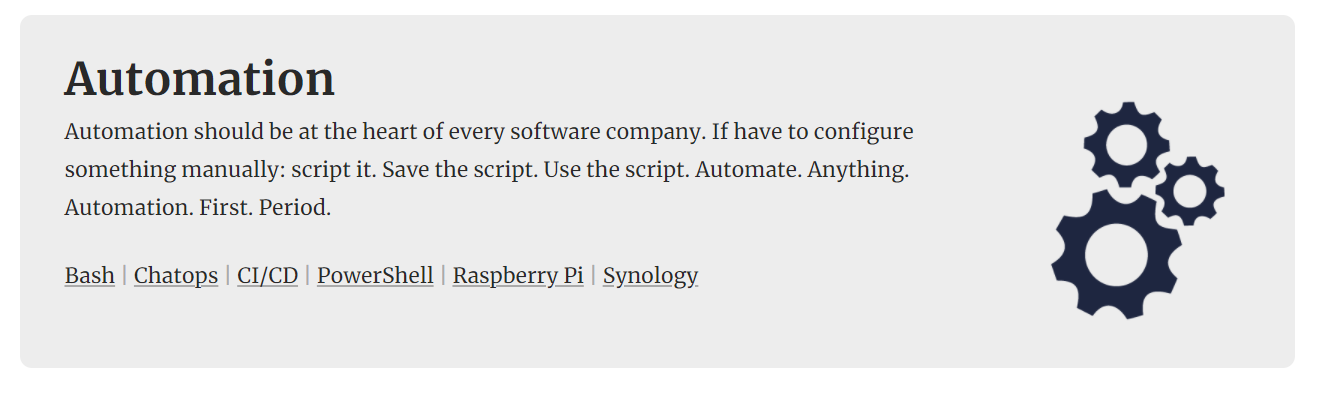
*The Automation menu shows the submenu items on the category page.*
## Part 1: a method
Let's start with a method that generates the menu by calling `wp_nav_menu`. By default it generated the *entire* menu structure. But... we've added a `sub_menu` switch to the array. We'll use it to generate the sub menu.
```php
function ktt_get_sub_menu($menu = 'Main Menu', $menu_class = "tax-sub-menu")
{
return wp_nav_menu(array(
'menu' => $menu,
'sub_menu' => true,
'echo' => true,
'items_wrap' => '',
'walker' => '',
));
}
```
The output is pretty plain: a bunch of `li` and `a` elements. This makes styling easier.
## Part 2: a hook
Let's hook into the `wp_nav_menu_objects` to filter the menu. We're only intereseted in the *children* of the current menu item. If the current page is not part of the menu, we'll return an empty array:
```php
add_filter('wp_nav_menu_objects', 'ktt_sub_menu_items', 10, 2);
// filter_hook function to react on sub_menu flag
function ktt_sub_menu_items($sorted_menu_items, $args)
{
if (!isset($args->sub_menu)) {
return $sorted_menu_items;
}
$current_id = 0;
// find the current menu item
foreach ($sorted_menu_items as $menu_item) {
if ($menu_item->current) {
$current_id = $menu_item->ID;
break;
}
}
if ($current_id == 0) return [];
// only use items that are direct children of the current
foreach ($sorted_menu_items as $key => $item) {
if ($item->menu_item_parent != $current_id) {
unset($sorted_menu_items[$key]);
}
}
return $sorted_menu_items;
}
```
Note: I use the same page for both *tags* and *categories* and it works for both. The reason it works, is that we based it on the *menu* and the menu is agnostic to which objects are underneath it 😁.
## Usage
On my category page, I just echo the result after the description:
```php