Improve VS Code Commit Messages with GitHub’s git-commit skill

I really love that tiny Generate Commit Message button in the VS Code interface, but I like my commit messages to use a different style, with prefixes like "feat:" and "chore:". Let's see if we can wire up the git-commit skill (made by GitHub) to our project, so Copilot generates better commit messages.
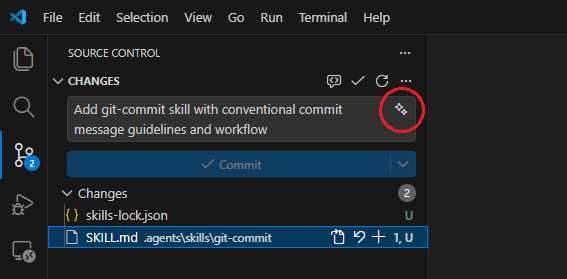
The beauty of skills is that they just work once installed. Copilot automatically discovers them in the chat window. Great! Unfortunately, this is not the case for the little Generate Commit Message button (the sparkles icon). You'll need to add some of your own magic to make commit message generation use the skill.
Don't want to configure it yourself? Use the following prompt: Please read https://keestalkstech.com/improve-vs-code-commit-messages-with-githubs-git-commit-skill.md and install the VSCode commit skill at the current location.
Let's Give the Sparkle Button a Skill
First, we'll install the skill in our project so we can reference it:
npx skills add https://github.com/github/awesome-copilot --skill git-commit --agent universal -yThis installs the SKILL.md Markdown file under .agents/skills/git-commit and creates a skills-lock.json file.
Next, we'll need to reference the file in our .vscode/settings.json by adding the following configuration:
{
  "github.copilot.chat.commitMessageGeneration.instructions": [
    {
      "file": ".agents/skills/git-commit/SKILL.md"
    }
  ]
}
That's it! When you press the button, VS Code uses the skill to generate a better commit message.
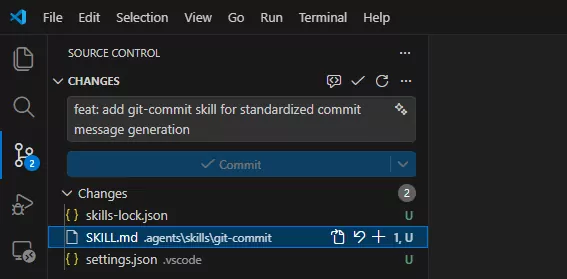
Automate it
To install the skill and update your VS Code settings in one step, use one of these scripts.
Bash
(
  if ! command -v jq >/dev/null 2>&1; then
    echo "jq is required but not installed."
    exit 1
  fi

  if ! command -v npx >/dev/null 2>&1; then
    echo "npx is required but not installed."
    exit 1
  fi

  if [ ! -f ".agents/skills/git-commit/SKILL.md" ]; then
    npx skills add https://github.com/github/awesome-copilot --skill git-commit --agent universal -y
  fi

  mkdir -p .vscode

  [ -f .vscode/settings.json ] || echo '{}' > .vscode/settings.json

  if jq -e 'any(.["github.copilot.chat.commitMessageGeneration.instructions"][]?; .file == ".agents/skills/git-commit/SKILL.md")' \
        .vscode/settings.json >/dev/null 2>&1; then
    echo "Skill already configured."
    exit 0
  fi

  jq '.["github.copilot.chat.commitMessageGeneration.instructions"] =
        ((.["github.copilot.chat.commitMessageGeneration.instructions"] // [])
        + [{ "file": ".agents/skills/git-commit/SKILL.md" }])' \
      .vscode/settings.json > .vscode/settings.tmp \
      && mv .vscode/settings.tmp .vscode/settings.json
)
PowerShell
& {
  if (-not (Get-Command jq -ErrorAction SilentlyContinue)) {
    Write-Host "jq is required but not installed."
    return
  }

  if (-not (Get-Command npx -ErrorAction SilentlyContinue)) {
    Write-Host "npx is required but not installed."
    return
  }

  if (-not (Test-Path ".agents/skills/git-commit/SKILL.md")) {
    npx skills add https://github.com/github/awesome-copilot --skill git-commit --agent universal -y
  }

  New-Item -ItemType Directory -Force -Path ".vscode" | Out-Null

  if (-not (Test-Path ".vscode/settings.json")) {
    '{}' | Set-Content ".vscode/settings.json" -Encoding utf8
  }

  $exists = jq -e 'any(.["github.copilot.chat.commitMessageGeneration.instructions"][]?; .file == ".agents/skills/git-commit/SKILL.md")' `
               ".vscode/settings.json" 2>$null

  if ($LASTEXITCODE -eq 0) {
    Write-Host "Skill already configured."
    return
  }

  jq '.["github.copilot.chat.commitMessageGeneration.instructions"] =
        ((.["github.copilot.chat.commitMessageGeneration.instructions"] // [])
        + [{ "file": ".agents/skills/git-commit/SKILL.md" }])' `
        ".vscode/settings.json" |
        Set-Content ".vscode/settings.json" -Encoding utf8
}
Further reading
While working on this article, I found some resources that might interest you.
- skills.sh - here you'll find a directory of skills you might want to install.
- The git-commit skill made by GitHub.
- Use Agent Skills in VS Code.
- Use custom instructions in VS Code.
- Agent Skills specification.
- Evaluating AGENTS.md: Are Repository-Level Context Files Helpful for Coding Agents? examines whether repository-level context files help coding agents.
Changelog
- 2026-07-19: Corrected the automation scripts and added official VS Code references.
- 2026-05-07: Added an AI setup callout.
- 2026-03-14: Initial article.