A Stack data structure in TypeScript

The JavaScript Array has everything to acts as a nice Stack structure, the only thing is missing is a peek() method. In this blog I'll discuss two ways of implementing a stack based on the array.
[outline]
What's a stack?
A picture says more than words:
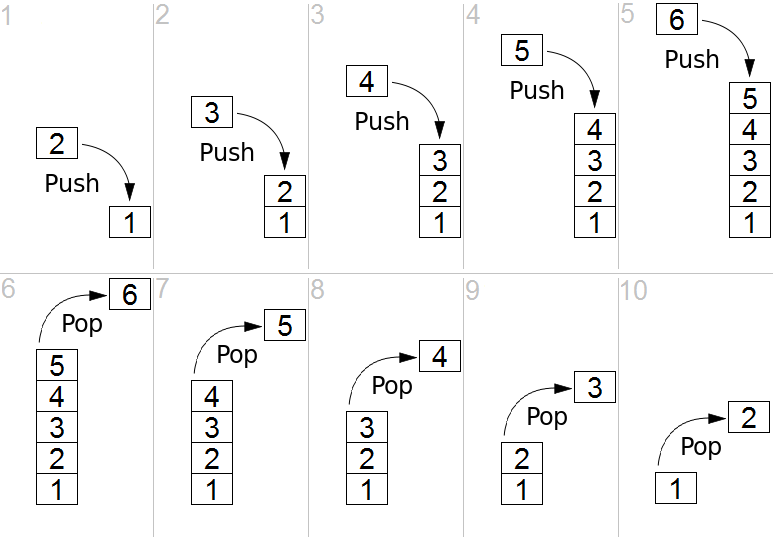
Let's start with defining the what a stack should look like and let's keep it as close to what the Array already gives us:
interface Stack<T> {
  push(item: T): number
  pop(): T | undefined
  peek(): T | undefined
  readonly length: number
  [Symbol.iterator](): Iterator<T>
}
Note: I've included the iterator to support spreading without having to cast.
Module augmentation
The push, pop, length and iterator are already present on the Array object. The only thing we miss is the peek object. Let's use TypeScript module augmentation to add the peek feature to the array:
//!file: m-stack.ts

export interface Stack<T> {
  push(item: T): number
  pop(): T | undefined
  peek(): T | undefined
  readonly length: number
  [Symbol.iterator](): Iterator<T>
}

declare global {
  interface Array<T> {
    peek(): T
  }
}

if (!Array.prototype.peek) {
  Array.prototype.peek = function <T>(): T {
    return this.length == 0
      ? undefined
      : this[this.length - 1]
  }
}
You can use it like this:
import { Stack } from "./m-stack"
import "./m-stack"

let stack: Stack<string> = []
stack.push("kaas")
stack.push("is", "heel")
stack.push("lekker")

console.log(stack.length, stack.peek());
stack.pop()
console.log(stack.length, stack.peek());
When we forget import "./m-stack", we'll get a runtime error: TypeError: stack.peek is not a function! Took me some time to figure out why.
Pro:
Con:
A class wrapper
If we don't want to pollute the array, we could create our own Stack class based on the Array:
//!file: n-stack.ts

export class Stack<T> {
  private items: T[]

  constructor(iterable: Iterable<T> = []) {
    this.items = [...iterable]
  }

  pop = () => this.items.pop()
  push = (...items: T[]) => this.items.push(...items)
  peek = () =>
    this.length == 0
      ? undefined
      : this.items[this.length - 1]

  get length() {
    return this.items.length
  }

  *[Symbol.iterator]() {
    for (let item of this.items) yield item
  }
}
Usage is similar:
import { Stack } from "./n-stack"

let stack = new Stack<string>()
stack.push("kaas")
stack.push("is", "heel")
stack.push("lekker")

console.log(stack.length, stack.peek());
stack.pop()
console.log(stack.length, stack.peek());

console.log([...stack])
Pro:
Con:
Bonus: Queue
If you want a queue in the same way, just switch the pop for shift. The peek is always the first items of the array.
export class Queue<T> {
  private items: T[]

  constructor(iterable: Iterable<T> = []) {
    this.items = [...iterable]
  }

  shift = () => this.items.shift()
  push = (...items: T[]) => this.items.push(...items)
  peek = () =>
    this.length == 0
      ? undefined
      : this.items[0]

  get length() {
    return this.items.length
  }

  *[Symbol.iterator]() {
    for (let item of this.items) yield item
  }
}
Conclusion
Implementing a Queue or a Stack in TypeScript is pretty straightforward. The heavy lifting has already been done by the native Array class. My preference goes to the class-implementation as it does not pollute and is easy to use. I would advise to stay as close to the Array API as possible.